
Help Center
Tasks
Create, assign, and track tasks for your team with due dates, priorities, and status tracking.
Last updated
Tasks help you and your team stay on top of follow-ups, action items, and internal to-dos. Every task can be assigned to a team member, given a due date and priority, and linked to a contact or opportunity so nothing falls through the cracks.
Task List#
The tasks page shows all tasks in your sub-account as a filterable, sortable list. Each row displays the task title, assignee, due date, priority, status, and any linked records.
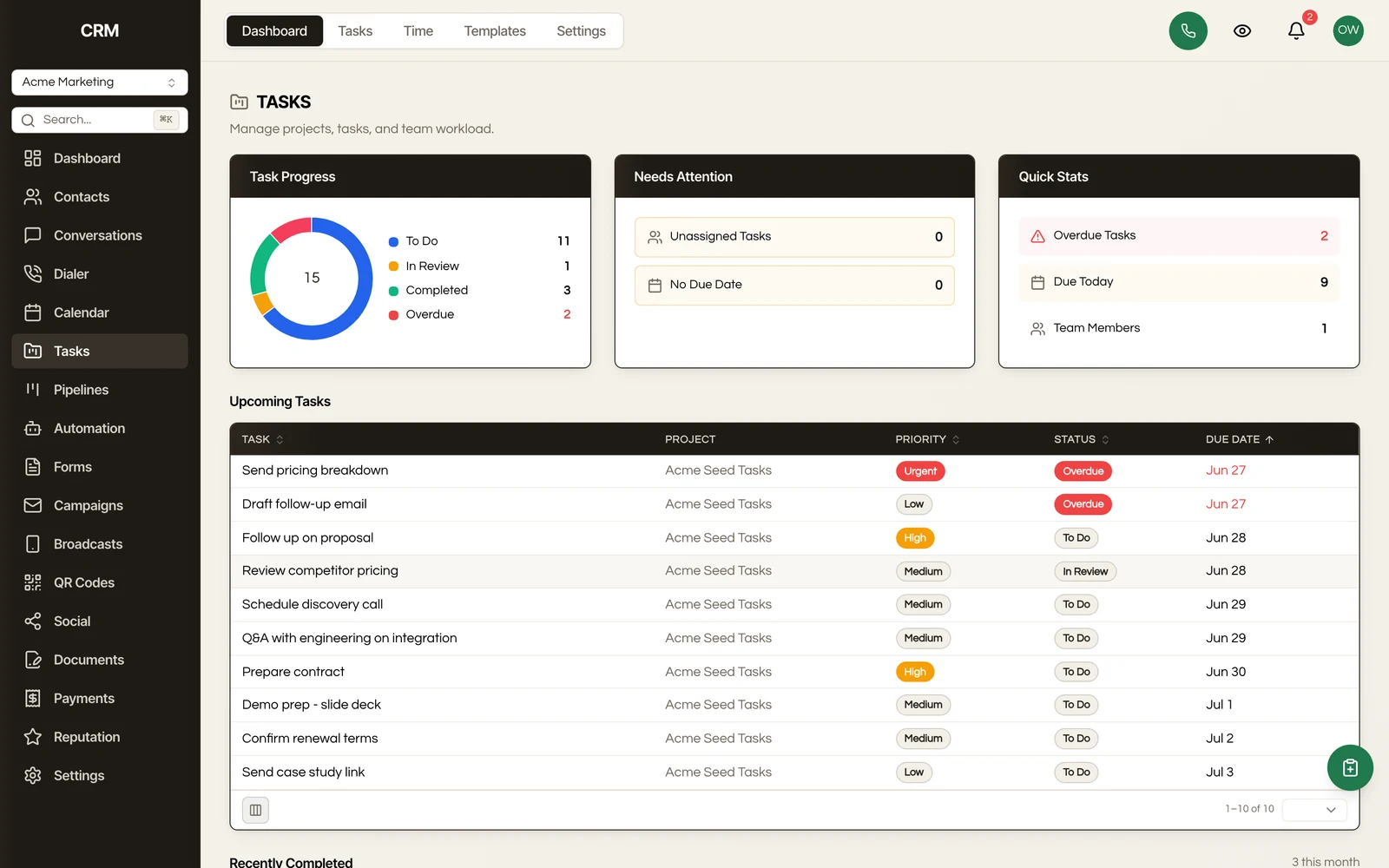
Overdue tasks are highlighted so they stand out. You can switch between viewing all tasks, only your tasks, or tasks assigned to a specific team member.
Creating a Task#
- Click New Task
- Fill in the details:
| Field | Required | Description |
|---|---|---|
| Title | Yes | A short description of what needs to be done |
| Description | No | Additional context or instructions |
| Due date | No | When the task should be completed by |
| Priority | No | Low, Medium, High, or Urgent |
| Assignee | No | The team member responsible for this task |
| Linked contact | No | Associate the task with a contact record |
| Linked opportunity | No | Associate the task with a pipeline opportunity |
- Click Create
You can also create tasks from a contact's detail page or an opportunity's detail view. When you do, the link to that record is set automatically.
Task Statuses#
Every task has a status that indicates its progress:
| Status | Meaning |
|---|---|
| To Do | The task has not been started yet |
| In Review | The task is underway or awaiting review |
| Completed | The task is finished |
| Cancelled | The task will not be worked - kept in the list for the record, not the queue |
Change a task's status by clicking the status indicator on the task row or from the task detail view. Completed and cancelled tasks remain visible in the list so you can review what happened, and you can filter them out if you prefer a clean view.
Deleting a contact cancels its open tasks rather than completing them, so a task cancelled by a contact delete reads as such in your reports (and in the task.updated webhook payload) instead of falsely reporting the work as done.
Filtering and Sorting#
Filters#
Narrow the task list by:
- Status - To Do, In Review, Completed, or Cancelled
- Priority - Low, Medium, High, or Urgent
- Assignee - Filter to a specific team member
- Due date - Overdue, due today, due this week, or a custom date range
- Linked record - Tasks linked to a specific contact or opportunity
Combine multiple filters to focus on exactly the tasks you need to see.
Sorting#
Sort the task list by:
- Due date (nearest first or farthest first)
- Priority (high to low or low to high)
- Created date
- Status
- Assignee name
Linked Records#
Tasks can be linked to contacts and opportunities. When a task is linked:
- The task appears on the contact's or opportunity's detail page under a Tasks section
- Clicking the linked record name on the task takes you directly to that record
- Completing a linked task is logged in the related record's activity timeline
This keeps your tasks connected to the context where they matter, so your team can see outstanding action items without switching between modules.
Summary#
| Feature | Detail |
|---|---|
| Fields | Title, description, due date, priority, assignee, linked contact, linked opportunity |
| Statuses | To Do, In Review, Completed, Cancelled (also assigned automatically when a linked contact is deleted) |
| Priorities | Low, Medium, High, Urgent |
| Filtering | By status, priority, assignee, due date, and linked record |
| Sorting | By due date, priority, created date, status, or assignee |
| Linked records | Tasks appear on contact and opportunity detail pages with activity logging |