Marketing

A social media scheduling tool that ships inside a CRM you own outright

Plan a month of posts on one calendar, publish to Facebook, Instagram, and LinkedIn, then track what worked. No per-seat fee, no monthly scheduler subscription stacked on top.

JL
MG
RD
AB
AR
Rated 5/5 on Trustpilot by early owners

One payment. Full source code. Unlimited seats, every client, forever.

crm.youragency.com/social
Social Media in the Seedly CRM

Seedly CRM Testimonials: The Receipts

Don't take our word for it. Take theirs.

Early Seedly owners, in their own words. Every review verified on Trustpilot.

Verified · Trustpilot
The reason I love Seedly is ownership. You own the codebase instead of renting and watching the provider change things constantly.
Joshua LockhartJun 26, 2026

Owns the codebase

Verified · Trustpilot
Buying from someone I didn't know was a bit of a leap of faith. Would he actually deliver? I've been pleasantly surprised. Andrew has been fair, and sometimes more than fair.
Matt GordonMay 23, 2026

Migrated from HighLevel

Verified · Trustpilot
I'm a long-time GHL user. Support is a nightmare. With Seedly, I am the support. I am my own headache or genius.
Rain DelawareMay 22, 2026

Long-time GoHighLevel user

Verified · Trustpilot
You get the entire code base. So you can just use Claude to add features or customize it any way you want.
Aaron BurlesonMay 26, 2026

Full source owner

Verified · Trustpilot
Seedly frees you from the massive CRM conglomerates and lets you customize it the way YOU want it. Andrew built a tool that grows with you and doesn't lock you in.
Aaron RountreeMay 23, 2026

Agency owner

Every review, 5 out of 5.

Read all reviews on Trustpilot ->

What It Does

Everything this module gives you, in the same source you own.

Calendar planner with drag-to-schedule

A full month calendar shows every scheduled, published, and failed post color-coded by platform and status. Drafts live in a side panel and schedule by dragging them onto a day. Click any empty day to compose for that date.

Analytics dashboard with best-time recommendations

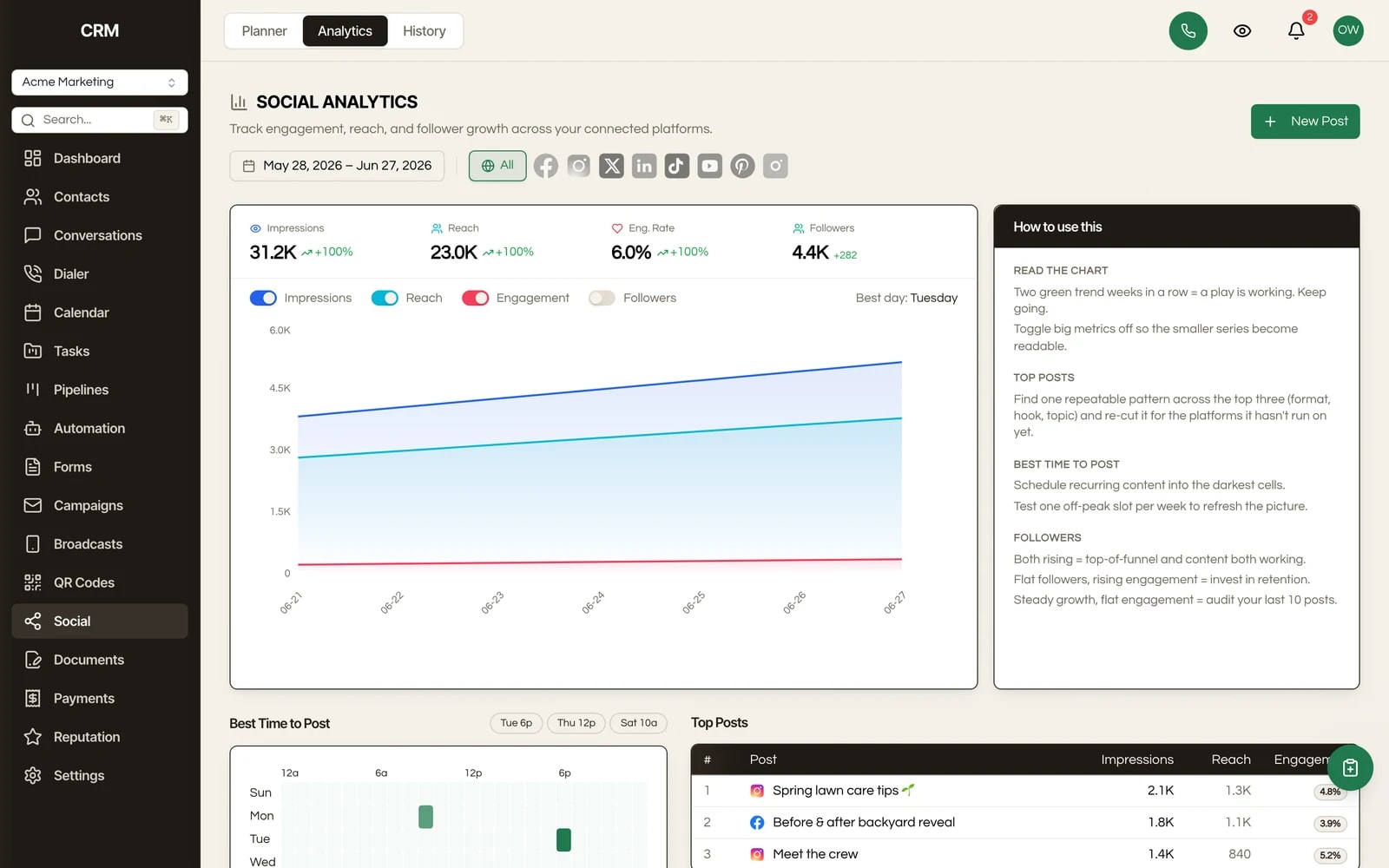
Track impressions, reach, engagement rate, and follower growth over any date range, compared against the prior period. A best-time-to-post heatmap and a top-posts leaderboard tell you what to repeat. Daily follower snapshots chart growth over time.

Multi-platform composer

Write once and publish to Facebook, Instagram, and LinkedIn, with the same composer also covering X, TikTok, YouTube, Pinterest, and Google Business profiles. Supports media upload, a scheduled publish time, a pinned first comment, recurring posts, and per-platform content overrides.

Recurring posting queue

Define reusable posting slots by day of week, time, and timezone. New content drops into the next open slot automatically, so a consistent cadence does not depend on someone remembering to schedule each post.

Comment management from inside the CRM

View and reply to comments on your published posts without leaving Seedly. Comments stream in live, and your replies post straight back to the platform. No bouncing between native apps.

Approval workflow

Drafts can be submitted for review, then approved or rejected with a note before anything goes live. Built for agencies that need a client or a senior to sign off before a client's account posts.

Hashtag groups and bulk upload

Save reusable hashtag collections and drop a batch of posts in at once, instead of building each one by hand.

Wired into the rest of the CRM

Link a post to the contacts and deals it relates to, and turn a five-star review from the Reputation module into a social post with the copy prefilled. The scheduler is not a bolt-on; it shares the same database as your pipeline and inbox.

How It Works

In plain English.

1

What a scheduling tool is

A social media scheduling tool is software that lets you write posts ahead of time and have them publish automatically at a chosen time, so you batch a week or a month of content in one sitting instead of logging into each network every day.

2

Connect each account once

In Seedly, you first connect each social account through a secure authorization popup: Facebook, Instagram, LinkedIn, and the others. It is a one-time connect per account, per client sub-account.

3

Compose, then schedule your way

Compose a post in the planner: type your copy, upload images or video, and choose which connected accounts it goes to. Then pick a publish time, drag the draft onto a calendar day, or let the recurring queue place it in your next open slot. At the scheduled moment, the post publishes to each network on its own.

4

Read results and respond

Afterward, the analytics tab pulls back performance numbers and incoming comments so you can respond and refine, all from the same screen.

The Rest Of The Garden

It is one CRM, not a stack of subscriptions.

Every module ships in the same source code you own. Slide through the rest of the garden.

FAQ

Questions, answered.

Which platforms can I post to?

Facebook, Instagram, and LinkedIn are the core supported networks. The composer also covers X (Twitter), TikTok, YouTube, Pinterest, and Google Business profiles. You connect each account once and publish to any combination from a single post.

Can I schedule across all my client sub-accounts?

Yes. Seedly is multi-tenant by design. Each client gets a sub-account with its own connected social accounts, calendar, and analytics, fully isolated from your other clients, all running on one install. There is no per-sub-account scheduler charge.

Can I white-label the social planner?

Yes. The planner lives inside the CRM, and Seedly is white-labeled per client: your branding on the chrome, your login domain, no third-party scheduler logo in front of your clients.

Does it recommend the best time to post?

Yes. The analytics dashboard builds a best-time heatmap from your account's actual performance, and the composer surfaces the top slots as one-click pills that auto-fill the date and time when you click them.

Can I manage comments without leaving the CRM?

Yes. Each published post has a comments panel where you read incoming comments and reply directly. Comments arrive live, and your replies post back to the network.

What analytics do I get?

Impressions, reach, engagement rate, and follower count, charted over any date range and compared to the prior period, plus a top-posts leaderboard and daily follower snapshots so you can see growth trends over time.

Is there an approval step before a client's post goes live?

Yes. A post can be submitted for approval, then approved or rejected with a note. Nothing publishes until it clears the review gate, which is what you want when a client or a manager signs off on content.

What does it cost to run?

There is no per-seat or per-sub-account fee from Seedly, because you own the code. Publishing runs through a managed social-publishing service that connects to the networks. You connect your own accounts; the planner itself is yours once you buy the CRM. Confirm the exact publishing-service plan in the integrations docs at launch.

Can I customize it?

Yes. You own the source. The posting cadence, the approval rules, the supported platforms, and the analytics views are all in code you can change, or have an AI assistant change for you.

Sprout the mascot peeking around the right edge of the pricing card
$1,499Once

One-time payment. No subscriptions. No renewals.


  • Complete source code
  • 25+ CRM modules
  • 78 workflow automation nodes
  • Unlimited seats & users
  • Source you own, deployed on infrastructure you control
  • Step-by-step setup documentation
  • Full source code - yours to modify freely
  • Commercial license included
Buy Now - $1,499

Secure checkout via Stripe. Your license key is emailed instantly.