Growth

QR codes you can re-point anytime

Print a code once, then change where it sends people whenever you want. Every scan is tracked, the destination is yours to edit, and there are no per-scan fees because the whole thing runs on your own infrastructure.

JL
MG
RD
AB
AR
Rated 5/5 on Trustpilot by early owners

One payment. Full source code. Unlimited seats, every client, forever.

crm.youragency.com/qr-codes
QR Codes in the Seedly CRM

Seedly CRM Testimonials: The Receipts

Don't take our word for it. Take theirs.

Early Seedly owners, in their own words. Every review verified on Trustpilot.

Verified · Trustpilot
The reason I love Seedly is ownership. You own the codebase instead of renting and watching the provider change things constantly.
Joshua LockhartJun 26, 2026

Owns the codebase

Verified · Trustpilot
Buying from someone I didn't know was a bit of a leap of faith. Would he actually deliver? I've been pleasantly surprised. Andrew has been fair, and sometimes more than fair.
Matt GordonMay 23, 2026

Migrated from HighLevel

Verified · Trustpilot
I'm a long-time GHL user. Support is a nightmare. With Seedly, I am the support. I am my own headache or genius.
Rain DelawareMay 22, 2026

Long-time GoHighLevel user

Verified · Trustpilot
You get the entire code base. So you can just use Claude to add features or customize it any way you want.
Aaron BurlesonMay 26, 2026

Full source owner

Verified · Trustpilot
Seedly frees you from the massive CRM conglomerates and lets you customize it the way YOU want it. Andrew built a tool that grows with you and doesn't lock you in.
Aaron RountreeMay 23, 2026

Agency owner

Every review, 5 out of 5.

Read all reviews on Trustpilot ->

What It Does

Everything this module gives you, in the same source you own.

Dynamic, re-pointable codes

Every code is a short link that redirects to a destination you choose. The printed image stays fixed, but you can change where it points at any time. Open the code, edit its destination, and the change takes effect immediately, so anyone who scans the existing flyer, sign, or card from then on lands on the new page. No reprint, no re-sticker, no waste.

Scan analytics for every code

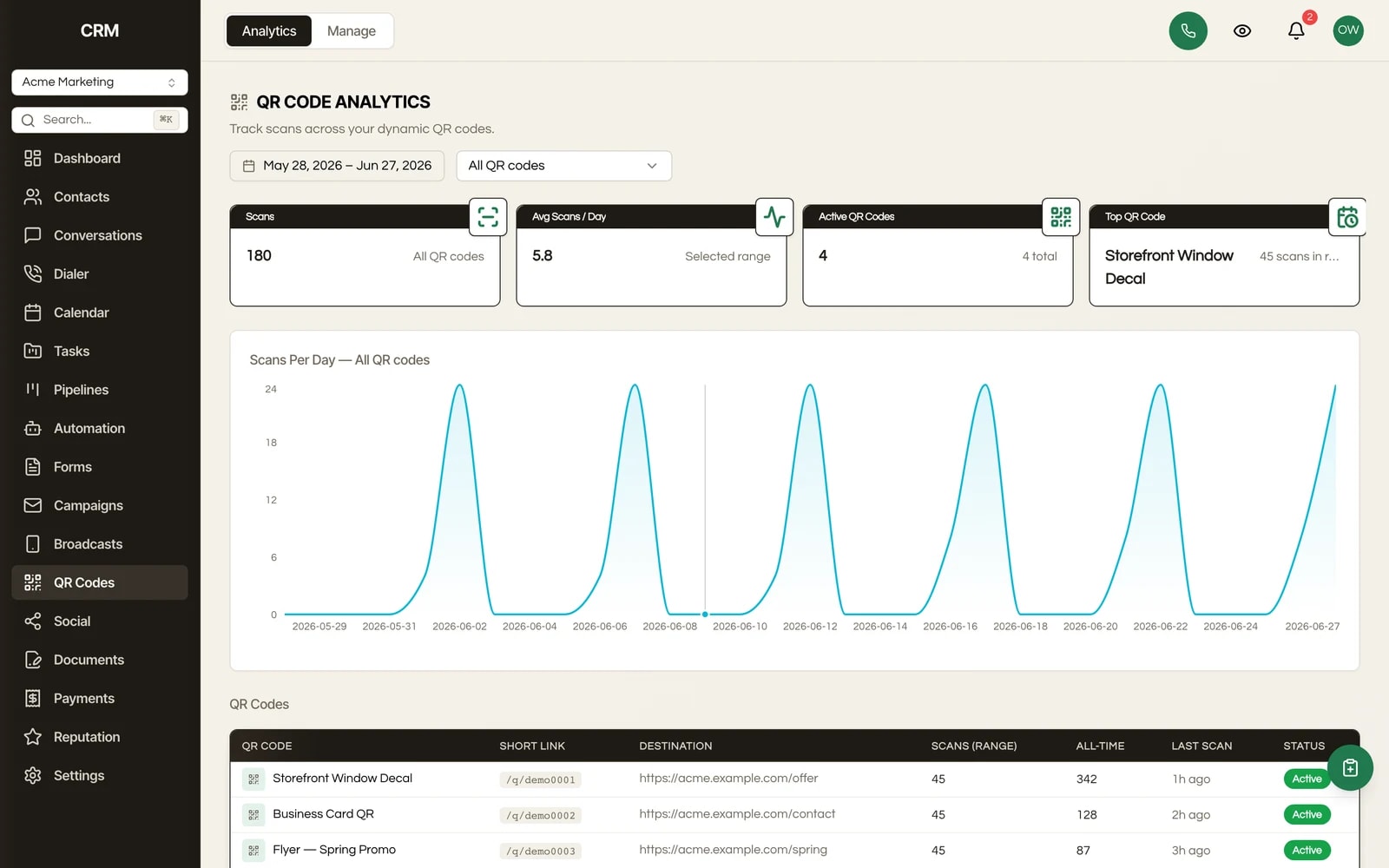
The Analytics tab shows how your codes are performing. KPI cards summarize total scans and activity at a glance, a scans-over-time chart plots daily volume with a dropdown to focus on a single code, and a per-code comparison lists every code side by side so you can spot your top performers. The tracking is built in, not a paid add-on.

Brand color and live preview

Customize each code's color to match your brand and check the result in a live preview before you commit. What you see is what gets printed, so a code never clashes with the material it lands on.

PNG download and copyable short link

Once a code is saved, download it as a PNG for print or digital use, or copy its short link to drop into an email, a landing page, or anywhere a link goes. Two ways out of the same code, both yours.

Folders for larger collections

Group codes into folders to keep a growing library tidy. When you run many campaigns or many clients, the Manage tab stays organized instead of becoming one long list.

Pause without deleting

Pause a code to stop it from redirecting. Scans of a paused code stop going through until you turn it back on, so you can retire a campaign without deleting the code or throwing away its scan history. Reactivate it later and it picks up where it left off.

Reuse printed materials for a new promotion

Because the destination is editable, the same printed code can serve a different offer each season. Point a recurring flyer at the current month's promotion, or fix a typo and a broken link after something is already in the wild, without ordering a single new print run.

No per-scan fees, no vendor lock

Commercial QR generators meter your scans and can hold a code hostage behind a plan tier or a lapsed subscription, which turns a printed code into a liability. Seedly's QR module is part of the source you self-host, so your codes keep redirecting on your terms, with no per-scan billing and no vendor in the middle.

How It Works

In plain English.

1

Create a code in the Manage tab

Open QR Codes, go to the Manage tab, and click New QR Code. Give it a name and set the destination URL, customize the color to match your brand, and check the live preview. Save it, then download the code as a PNG or copy its short link.

2

Print it anywhere, once

Put the code on a flyer, business card, sign, or product. The printed image is just a short link, so it never needs to change again. Organize your codes into folders if you are running a larger collection across campaigns or clients.

3

Re-point or pause whenever you want

Open any code and change its destination; the change is immediate, so every scan from then on goes to the new page. Running a seasonal campaign, fixing a broken link, or reusing old materials all happen here. Pause a code instead to stop it redirecting and retire a campaign without losing its history.

4

Read the scans on the Analytics tab

The Analytics tab shows total scans and activity in KPI cards, charts daily scan volume over time with a dropdown to focus on a single code, and lists every code side by side so you can compare performance and find your top performers.

The Rest Of The Garden

It is one CRM, not a stack of subscriptions.

Every module ships in the same source code you own. Slide through the rest of the garden.

FAQ

Questions, answered.

What makes a QR code dynamic?

A dynamic code is a short link that redirects to a destination you choose. The printed image stays the same forever, but you control where it sends people. That means you can change the destination after something is already printed, and you get scan analytics for each code. A static code, by contrast, bakes the URL into the image and can never change.

Can I change where a code points after it is printed?

Yes, that is the whole point. Open any code and edit its destination. The change takes effect immediately, so anyone who scans the existing printed code from then on is sent to the new destination. Use it for seasonal campaigns, for fixing a typo or a broken link after printing, or for reusing the same materials for a new promotion. No reprint required.

How do I create a QR code?

Go to the QR Codes module, open the Manage tab, and click New QR Code. Give it a name, set the destination URL, customize the color to match your brand, and check the live preview. Save it, then download the code as a PNG or copy its short link.

Can I track how many times a code is scanned?

Yes. The Analytics tab shows total scans and activity in KPI cards, charts daily scan volume over time with a dropdown to focus on a single code, and lists every code side by side so you can compare them. Scan tracking is built in, not a paid add-on.

Can I pause a code without deleting it?

Yes. Pause a code to stop it from redirecting; scans stop going through until you turn it back on. This lets you retire a campaign without deleting the code or its scan history, and you can reactivate it later whenever you want.

Can I organize a lot of codes?

Yes. Group codes into folders to keep a larger collection tidy. When you run many campaigns or manage many clients, the Manage tab stays organized instead of turning into one long list.

Are there per-scan fees or limits?

No. Seedly is self-hosted source code, so the QR module and its redirects run on your infrastructure. There is no per-scan billing and no plan tier that throttles a campaign as it grows. Your codes keep working on your terms, not a vendor's.

What happens to my codes if I ever stop paying a subscription?

Nothing, because there is no subscription. You buy the source once and own it. Unlike a commercial QR SaaS, where a lapsed plan can turn every printed code into a dead link, Seedly's redirects live on your own infrastructure and keep resolving for as long as you run the app.

Sprout the mascot peeking around the right edge of the pricing card
$1,499Once

One-time payment. No subscriptions. No renewals.


  • Complete source code
  • 25+ CRM modules
  • 78 workflow automation nodes
  • Unlimited seats & users
  • Source you own, deployed on infrastructure you control
  • Step-by-step setup documentation
  • Full source code - yours to modify freely
  • Commercial license included
Buy Now - $1,499

Secure checkout via Stripe. Your license key is emailed instantly.