Marketing

Email marketing for agencies, built into a CRM you own

Broadcasts, automated sequences, segmented sends, and real deliverability tracking. Run it across every client account from one install, with no per-contact or per-seat fees.

JL
MG
RD
AB
AR
Rated 5/5 on Trustpilot by early owners

One payment. Full source code. Unlimited seats, every client, forever.

crm.youragency.com/campaigns
Email Campaigns in the Seedly CRM

Seedly CRM Testimonials: The Receipts

Don't take our word for it. Take theirs.

Early Seedly owners, in their own words. Every review verified on Trustpilot.

Verified · Trustpilot
The reason I love Seedly is ownership. You own the codebase instead of renting and watching the provider change things constantly.
Joshua LockhartJun 26, 2026

Owns the codebase

Verified · Trustpilot
Buying from someone I didn't know was a bit of a leap of faith. Would he actually deliver? I've been pleasantly surprised. Andrew has been fair, and sometimes more than fair.
Matt GordonMay 23, 2026

Migrated from HighLevel

Verified · Trustpilot
I'm a long-time GHL user. Support is a nightmare. With Seedly, I am the support. I am my own headache or genius.
Rain DelawareMay 22, 2026

Long-time GoHighLevel user

Verified · Trustpilot
You get the entire code base. So you can just use Claude to add features or customize it any way you want.
Aaron BurlesonMay 26, 2026

Full source owner

Verified · Trustpilot
Seedly frees you from the massive CRM conglomerates and lets you customize it the way YOU want it. Andrew built a tool that grows with you and doesn't lock you in.
Aaron RountreeMay 23, 2026

Agency owner

Every review, 5 out of 5.

Read all reviews on Trustpilot ->

What It Does

Everything this module gives you, in the same source you own.

Drag-and-drop template builder

Build emails from blocks (text, image, button, divider, columns, spacer) with a live phone-frame mobile preview that shows exactly what lands on a phone. Save reusable templates in a folder-organized gallery, and drop in merge fields for per-contact personalization.

Segmented sends with a visual filter builder

Target a contact list, a reusable saved segment, or a one-off custom filter, all built with an AND/OR condition builder over your real CRM fields, tags, and custom fields. The same segments power campaigns and Smart lists, so your audiences stay in sync with your contact data.

Broadcasts and multi-step sequences

Send a one-time broadcast, or build an automated sequence that mixes email steps, SMS steps, wait steps, and condition steps with configurable delays and step-level analytics. An engagement gate can automatically exit or re-engage a contact after N consecutive unopened steps, so you stop hammering people who have gone quiet.

Suppression and consent management

A global suppression list tracks why each address is off-limits (unsubscribe, bounce, spam complaint, manual, or SMS STOP) and is applied per-recipient at send time. Optional double opt-in sends a branded confirmation email a contact must click before they are subscribed, for cleaner lists and better deliverability. Every marketing email carries a one-click unsubscribe link and a public preference center.

Deliverability tracking and sender protection

See bounces and failures broken down by mailbox provider (Gmail, Outlook, Yahoo, and others) so you can tell exactly where mail is not landing. Domain warmup ramps volume on a new sending domain over a schedule with daily DNS checks, sending presets pick a strategy for you, and a built-in checker validates your SPF, DKIM, DMARC, and MX records before you send.

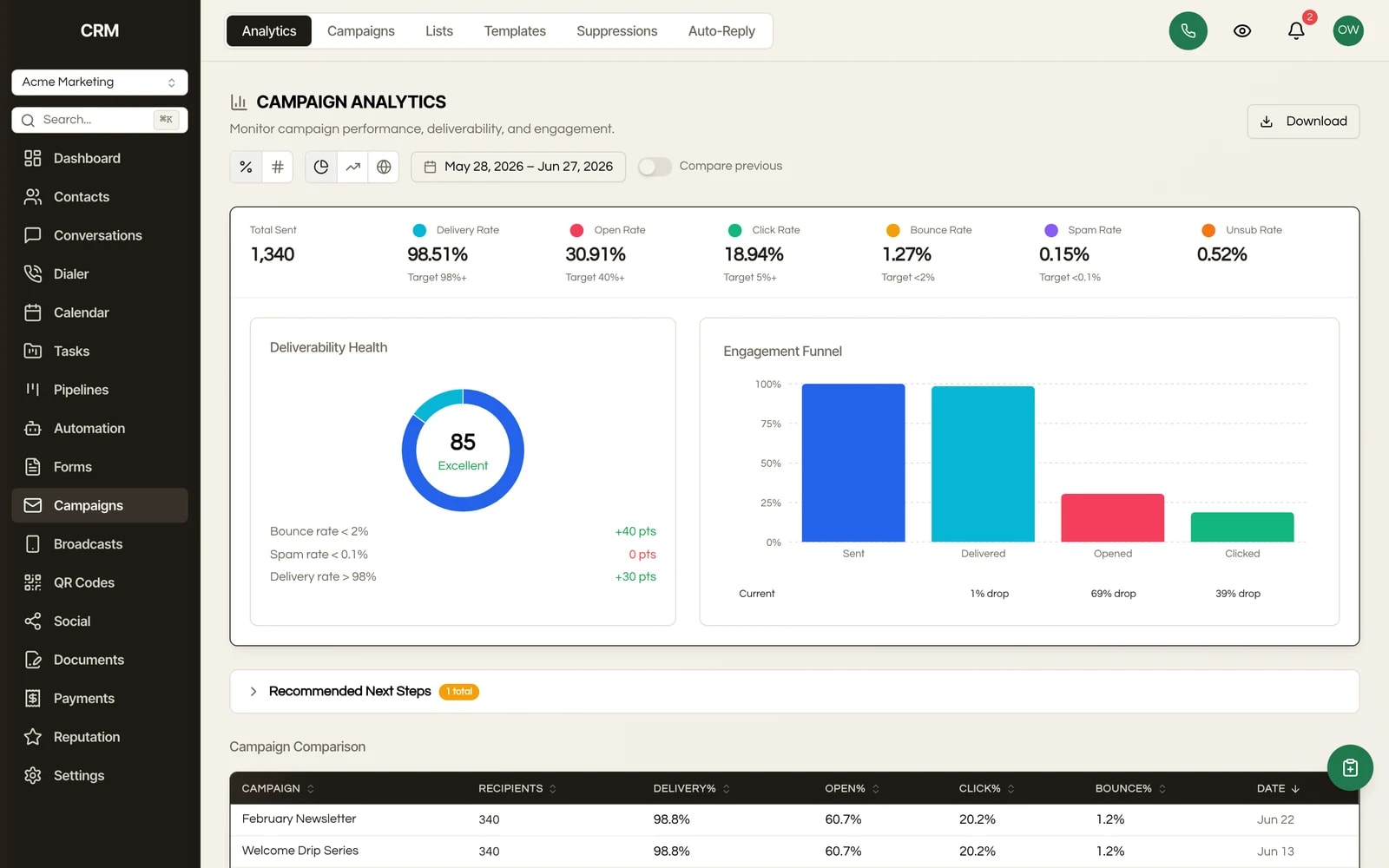
Campaign analytics and comparison

Opens, clicks, conversions, bounces, deliverability trends, and an engagement funnel per campaign, plus side-by-side comparison across campaigns and a per-provider stats table you can export. Click tracking includes a tracked-URL panel and 5-field UTM configuration per campaign, so attribution flows into the rest of your stack.

How It Works

In plain English.

1

It sends against your existing CRM data

Email Campaigns lives inside Seedly, so it sends against the same contacts, tags, and custom fields the rest of your CRM already uses. There is no separate audience to import and keep in sync.

2

Build once, pick a type and an audience

You build an email once in the block editor and save it as a template. When you send, you pick a campaign type (a one-time broadcast or an automated sequence) and choose an audience: a list, a saved segment, or a custom filter.

3

Send now or schedule, protections applied automatically

Send now or schedule for later with timezone handling. Seedly applies your suppression list and your warmup or throttle settings automatically, then delivers through your connected sending provider.

4

Results write back, opt-outs handle themselves

Opens, clicks, bounces, and conversions are recorded back onto each contact. Recipients always get a one-click unsubscribe and a preference center, and anyone who opts out or bounces is suppressed going forward without you lifting a finger.

The Rest Of The Garden

It is one CRM, not a stack of subscriptions.

Every module ships in the same source code you own. Slide through the rest of the garden.

FAQ

Questions, answered.

Can I use my own email sending provider?

Yes. Email sends through your own provider account (transactional mail via Postmark, bulk campaign mail via SendGrid), so the sending reputation and the bill are yours. You can set one provider at the agency level and have it cascade to every client account, or let each client connect their own in self-service mode.

Can each client send on their own domain and reputation?

Yes. Credentials resolve per sub-account first, then brand, then agency, so a client in self-service mode sends entirely under their own domain, provider account, and reputation, separate from every other client on your install.

Does it handle deliverability and suppression properly?

Yes. There is a global suppression list per account (covering unsubscribes, bounces, spam complaints, manual entries, and SMS STOP), applied to every send automatically. You also get a sending-domain checker for SPF, DKIM, DMARC, and MX records, domain warmup with daily DNS checks, throttle and stagger controls, and a per-provider breakdown of where mail is and is not landing.

Does it support double opt-in?

Yes. Double opt-in is available on signup forms: a new subscriber gets a branded confirmation email and is only added to the list after they click it. It is off by default and set per form, so you turn it on only where you want confirmed opt-in.

What are the 4 types of email marketing?

The usual four are: broadcast or newsletter sends (one message to a segment at once), promotional or offer emails, lifecycle and retention emails (onboarding, re-engagement, win-back), and transactional or triggered emails (receipts, reminders, confirmations). Seedly covers all four: broadcasts and sequences handle the first three, and Transactional lists keep receipts and account notices reaching contacts even after they opt out of marketing.

What is the cheapest email marketing platform?

Almost every email platform charges a recurring fee that climbs with your contact count, so the cheapest option keeps getting more expensive as your clients grow. Seedly takes the other side: you buy the source code once, own it, and pay no per-contact or per-seat email fee ever again. Your only ongoing email cost is your sending provider's pass-through rate, which is a fraction of a managed platform's per-contact pricing. Across an agency running many client lists, buy-once ownership is the cheapest path by a wide margin.

Can I migrate my list and campaigns from GoHighLevel?

You can bring your contacts in by CSV import with field mapping. To keep existing opt-outs honored, add your already-unsubscribed addresses to the suppression list, which also accepts CSV import, so those contacts stay suppressed on every send. Email templates are rebuilt in Seedly's block editor.

Can I customize the email builder or the sending logic?

Yes. You own the code, so the block editor, the warmup curve, the analytics, and the send pipeline are all yours to change or extend, rather than being locked to a vendor's roadmap.

Sprout the mascot peeking around the right edge of the pricing card
$1,499Once

One-time payment. No subscriptions. No renewals.


  • Complete source code
  • 25+ CRM modules
  • 78 workflow automation nodes
  • Unlimited seats & users
  • Source you own, deployed on infrastructure you control
  • Step-by-step setup documentation
  • Full source code - yours to modify freely
  • Commercial license included
Buy Now - $1,499

Secure checkout via Stripe. Your license key is emailed instantly.