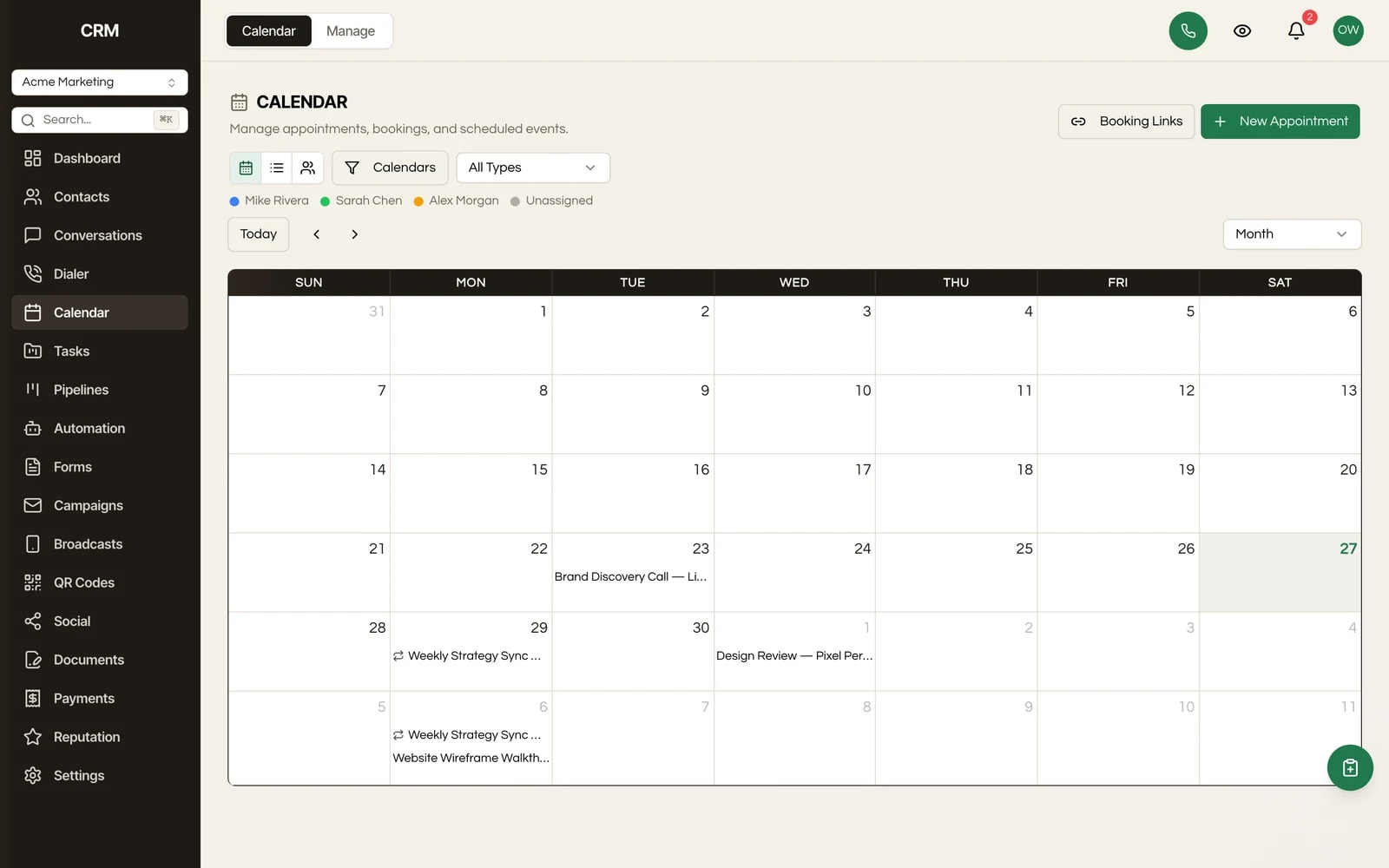
Scheduling

Booking pages that live on your domain

Four calendar types, public booking pages branded as you, and two-way Google and Outlook sync. It runs on your infrastructure, so there are no per-booking fees and no scheduling tool to renew.

JL
MG
RD
AB
AR
Rated 5/5 on Trustpilot by early owners

One payment. Full source code. Unlimited seats, every client, forever.

crm.youragency.com/calendars
Calendars & Booking in the Seedly CRM

Seedly CRM Testimonials: The Receipts

Don't take our word for it. Take theirs.

Early Seedly owners, in their own words. Every review verified on Trustpilot.

Verified · Trustpilot
The reason I love Seedly is ownership. You own the codebase instead of renting and watching the provider change things constantly.
Joshua LockhartJun 26, 2026

Owns the codebase

Verified · Trustpilot
Buying from someone I didn't know was a bit of a leap of faith. Would he actually deliver? I've been pleasantly surprised. Andrew has been fair, and sometimes more than fair.
Matt GordonMay 23, 2026

Migrated from HighLevel

Verified · Trustpilot
I'm a long-time GHL user. Support is a nightmare. With Seedly, I am the support. I am my own headache or genius.
Rain DelawareMay 22, 2026

Long-time GoHighLevel user

Verified · Trustpilot
You get the entire code base. So you can just use Claude to add features or customize it any way you want.
Aaron BurlesonMay 26, 2026

Full source owner

Verified · Trustpilot
Seedly frees you from the massive CRM conglomerates and lets you customize it the way YOU want it. Andrew built a tool that grows with you and doesn't lock you in.
Aaron RountreeMay 23, 2026

Agency owner

Every review, 5 out of 5.

Read all reviews on Trustpilot ->

What It Does

Everything this module gives you, in the same source you own.

Four calendar types

Build the calendar that fits the meeting. A personal calendar books one person. A round-robin calendar distributes bookings across a team so the load spreads evenly. A collective calendar finds a slot where every required attendee is free. A class or group event calendar takes many bookings into a single time slot, for webinars, workshops, and classes.

Public booking pages on your domain

Every calendar has a public booking page that clients visit to pick a date, choose a slot, fill in their details, and confirm. The page carries your logo and colors, not ours, and it lives on the domain you host. Share the link by email or SMS, embed it on a site, or drop it into a workflow.

Two-way Google and Outlook sync

Connect Google Calendar or Outlook and the sync runs both directions. Events already on the external calendar block out slots so nobody double-books you, and appointments booked through Seedly push back to the external calendar. Availability stays honest without any manual copying.

Auto-generated Zoom links

Set a calendar's location to video and each booking gets its own Zoom meeting link, generated automatically and included in the confirmation. The host and the client both get a working link without anyone pasting one in by hand.

Collect payment at booking

Charge for a slot at the moment it is reserved. The booking page can collect payment as part of the confirmation step, so paid consultations and deposits are handled before the appointment is even on the calendar.

Per-day availability with timezones

Define which days you take bookings and set different start and end times per day. Availability shows in your account timezone, and a client booking from another timezone sees the slots converted to their local time automatically.

Confirmations, reminders, and reschedule links

Booking fires an automatic confirmation email with the details, cancellation and reschedule links, and reminders you configure to land before the appointment. Rescheduling moves the time and fires a reschedule event that can trigger a workflow.

Appointments tie to contacts and workflows

Every booking links to a contact record. If the booker's email matches an existing contact, the appointment lands on that record; if not, a new contact is created from the form. Status changes across booked, confirmed, completed, cancelled, and no-show log to the timeline and can trigger automations.

How It Works

In plain English.

1

Pick the calendar that fits the meeting

Create a calendar and choose its type. Personal books one person, round-robin spreads bookings across a team, collective finds a slot where everyone required is free, and a class or group event calendar takes many bookings into one slot. Set the duration, location, and the per-day hours you are available.

2

Connect Google or Outlook

Link the calendar to Google Calendar or Outlook and the sync runs both ways. External events block your slots so nobody double-books you, and bookings made in Seedly push back to the external calendar. Turn on a video location and each booking gets an auto-generated Zoom link.

3

Share the public booking page

Each calendar has a public booking page branded with your logo and colors, living on your own domain. Send the link by email or SMS, embed it on a site, or drop it into a workflow. The client picks a slot, fills in the form, optionally pays, and confirms.

4

The appointment works itself into your CRM

On confirmation, the booking links to a contact record (matched by email or created fresh), sends the confirmation with reschedule and cancellation links, and queues the reminders you set. Status changes log to the contact timeline and can fire workflows on booked, confirmed, cancelled, no-show, and completed.

The Rest Of The Garden

It is one CRM, not a stack of subscriptions.

Every module ships in the same source code you own. Slide through the rest of the garden.

FAQ

Questions, answered.

What calendar types are there?

Four. A personal calendar books one person. A round-robin calendar distributes bookings across a team so the load spreads evenly. A collective calendar finds a slot where every required attendee is free. A class or group event calendar takes many bookings into a single time slot, for webinars, workshops, and classes.

Can clients book on my own domain?

Yes. Each calendar has a public booking page that lives on the domain you host, branded with your logo and colors. Share it by link or SMS, embed it on a website, or include it in a workflow or campaign. There is no vendor name in the URL and no third-party booking domain in front of your clients.

Does it sync with Google Calendar and Outlook?

Yes, both, and both directions. Events already on a connected Google Calendar or Outlook account block out your slots so nobody double-books you, and appointments booked through Seedly push back to that external calendar. Availability stays accurate without any manual copying.

Can I add video links to meetings?

Yes. Set a calendar's location to video and each booking gets its own auto-generated Zoom meeting link, included in the confirmation email. Neither you nor the client has to paste a link in by hand.

Can I take payment when someone books?

Yes. The booking page can collect payment as part of the confirmation step, so paid consultations and deposits are charged at the moment the slot is reserved, before the appointment is on the calendar.

Are there per-booking or per-seat fees?

No. Seedly is self-hosted source code you buy once. The booking pages and calendars run on your infrastructure, so there is no per-seat fee on the people who take bookings and no cut taken when a client pays at booking. The price does not change with your volume.

How do appointments connect to the rest of the CRM?

Every booking links to a contact record. If the booker's email matches an existing contact, the appointment lands on that record; otherwise a new contact is created from the booking form. Status changes across booked, confirmed, completed, cancelled, and no-show log to the contact's timeline and can trigger workflows, so a no-show or a completed call can kick off whatever follow-up you want.

How does timezone handling work?

You set your available hours per day in your account timezone, and a client booking from a different timezone sees those slots converted to their own local time automatically. Nobody has to do the math.

Does each client get separate calendars?

Yes. Every client runs in its own sub-account with its own calendars and booking pages, strictly isolated. One client can never see another's schedule, and you manage all of them from a single install.

Sprout the mascot peeking around the right edge of the pricing card
$1,499Once

One-time payment. No subscriptions. No renewals.


  • Complete source code
  • 25+ CRM modules
  • 78 workflow automation nodes
  • Unlimited seats & users
  • Source you own, deployed on infrastructure you control
  • Step-by-step setup documentation
  • Full source code - yours to modify freely
  • Commercial license included
Buy Now - $1,499

Secure checkout via Stripe. Your license key is emailed instantly.