The reason I love Seedly is ownership. You own the codebase instead of renting and watching the provider change things constantly.
Owns the codebase
Project Management
A kanban board, time tracking, reminders, and recurring work that run across every client sub-account. No per-seat fee, no second subscription.
One payment. Full source code. Unlimited seats, every client, forever.

Don't take our word for it. Take theirs.
Early Seedly owners, in their own words. Every review verified on Trustpilot.
What It Does
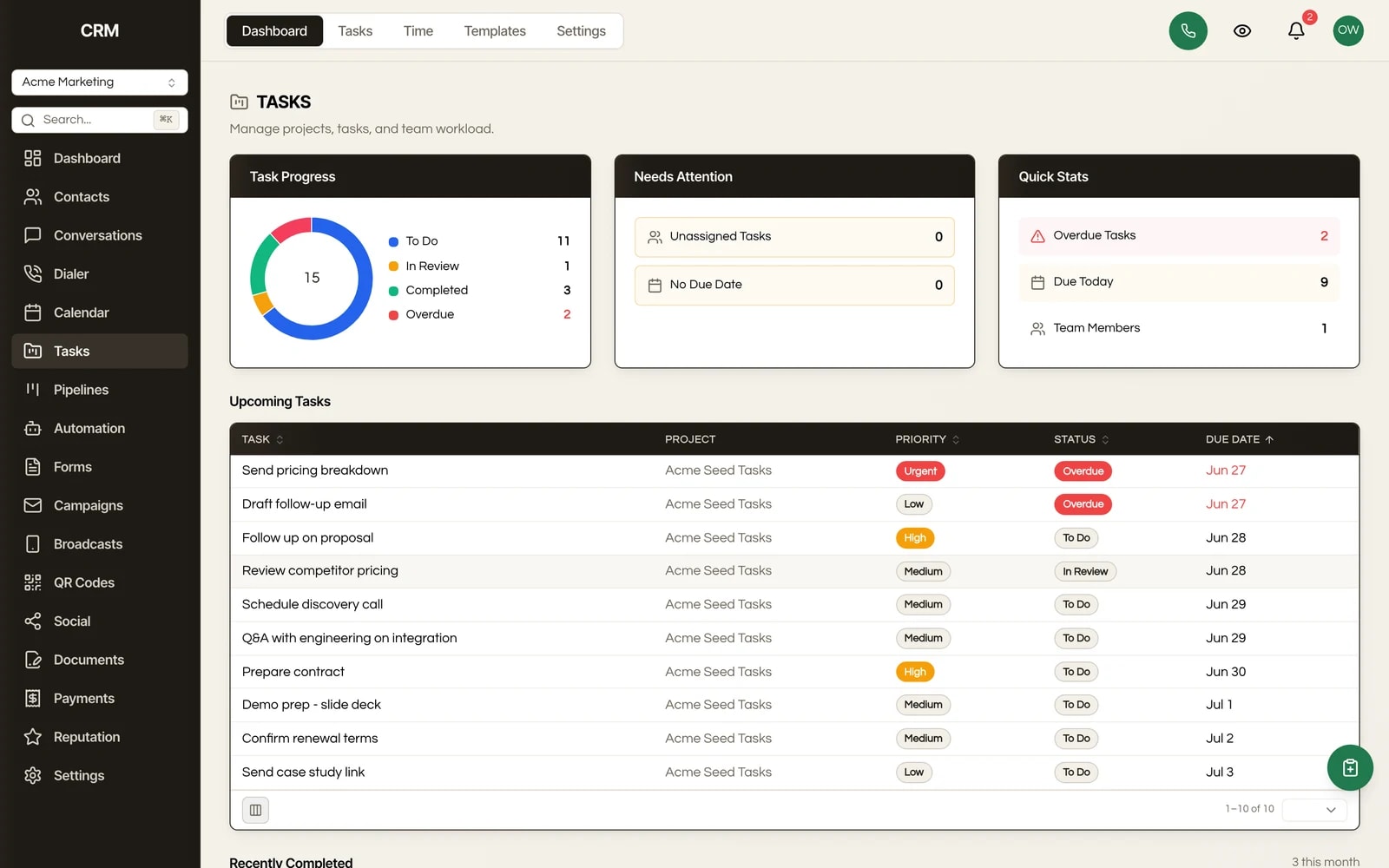
Each project gets a drag-and-drop board with three status columns (To Do, In Review, Completed). Drag a card between columns to change status, or reorder within a column, and switch to a list view when you want a table instead. A per-user timer lives on each task: start it, stop it, or add time by hand, and a Time Analytics view rolls hours up by team member and by project, then exports every filtered entry to a CSV (entry id, date, project, task, user, duration in minutes and hours, manual vs timer).
Task events (created, updated, completed, assigned, and the due-soon reminder) plus project-created events all fire into the automation engine, and workflow actions can create tasks in return. A closed deal or a new Stripe purchase can spin up the project and its full task list with no manual step, so your project board talks to the rest of the CRM without a tool in the middle.
Every task carries a title, rich-text description, one or more assignees from your team, a due date, a priority (Low, Medium, High, Urgent), an estimated time, and color tags. Overdue and due-today tasks are surfaced automatically on the dashboard.
When a task is due soon or overdue, the assignee gets an in-app notification and a branded email, and the same event can fire a workflow. So a due-tomorrow reminder can also trigger an SMS, a Slack-style alert, or any other automation you build.
Define a reusable set of tasks and subtasks with due-date offsets once (an onboarding checklist, a monthly SEO package), then apply it to any new project. Recurring tasks regenerate on a daily, weekly, biweekly, or monthly schedule, so standing work re-creates itself.
Open any task for a detail panel with subtask checklists, blocks and blocked-by dependencies, threaded comments, and a full activity log. Tasks can be duplicated and bulk-updated (status, assignee, archive).
A public intake link lets people outside your team request work. Requests land in a Submissions queue where an operator approves one (which creates a task) or rejects it. Useful for client request forms or internal ticket triage.
How It Works
Work is organized into projects, and each project holds tasks. Open a project to see its kanban board, drag cards between To Do, In Review, and Completed, and click any card to assign people, set a due date and priority, add subtasks, or link a dependency.
Need to log effort? Hit the timer on the task, or enter time by hand. Reminders and overdue alerts go out on their own as due dates approach, reaching the assignee by in-app notification and branded email.
Save a template set for repeatable work and apply it in one click, set a task to recur on a schedule, or let a workflow create tasks automatically when a deal closes or a client buys a package.
Your contacts, deals, and conversations sit in the same install as your task boards, so a task can point back to the client it belongs to, and a board can be white-labeled to match each client's brand.
The Rest Of The Garden
Every module ships in the same source code you own. Slide through the rest of the garden.
FAQ
Yes. Every project gets a drag-and-drop kanban board with To Do, In Review, and Completed columns. Drag a card to change its status or reorder it, and switch to a list view when you want a table instead.
Yes. Each task takes one or more assignees, a due date, a priority (Low, Medium, High, Urgent), an estimated time, color tags, and a rich-text description. Overdue and due-today tasks are flagged automatically on the dashboard.
Yes. When a task is due soon or goes overdue, the assignee gets both an in-app notification and a branded email. The same reminder can also trigger a workflow, so you can layer on an SMS or any other automation.
Yes. Task events (created, updated, completed, assigned, reminder) feed the automation engine, and workflow actions can create tasks back. A closed deal or a new Stripe purchase can spin up the whole project and its task list automatically.
Yes. Each task has a per-user start/stop timer plus manual entry. A Time Analytics view totals hours by team member and by project, and exports every filtered entry to a CSV you can hand to a client or drop into payroll.
Yes. Tasks and projects are scoped per sub-account, so you run a separate board for each client from the same install, white-labeled to their brand. There is no extra fee per client.
GoHighLevel's task feature is thin, so most teams are moving off a separate PM tool rather than GHL itself. There is no dedicated task-import wizard, so a migration would run through the REST API or a one-time import, and template sets let you rebuild your standard project structures fast.
Nothing per seat and nothing per project. You bought the source once, and the Tasks module runs on the same infrastructure as the rest of your CRM. Adding more team members or more client boards does not change the bill.
Yes. It is your code. The status columns, priority levels, reminder timing, CSV format, and board behavior are all editable, on your own or with Claude.

One-time payment. No subscriptions. No renewals.
Secure checkout via Stripe. Your license key is emailed instantly.