
Help Center
Calls
Make and receive calls right in your browser, log every call automatically, and see call performance at a glance.
Last updated
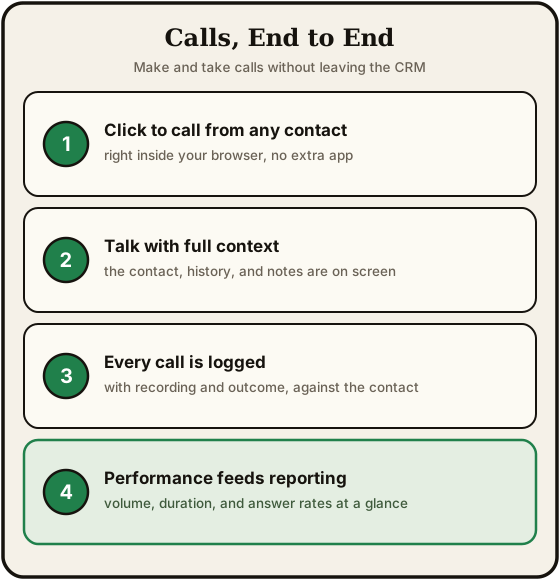
Seedly includes a built-in phone so your team can call leads and customers without a separate softphone app. Calls are placed and answered in the browser, logged automatically against the contact, and threaded into the same inbox as your messages.
Making Calls#
The dialer#
A dialer is available from anywhere in the app. Open it to:
- Dial a number on the keypad
- Mute a call or place it on hold
- Drop a pre-recorded voicemail when you reach an answering machine
- Hang up and tag the result without leaving the screen
Click to call#
From a contact record, click the phone number (or the call button) to start a call instantly. Seedly matches the call to that contact automatically, so there is nothing to look up or paste.
Receiving calls#
Inbound calls to your connected numbers ring in the browser. Answer in one click, and the contact's details appear alongside the call so you know who you are talking to before you say hello.
During and After a Call#
| Feature | What it does |
|---|---|
| Recording | Calls can be recorded and played back later from the call log |
| Transcript | A written transcript is available for recorded calls |
| Disposition | Tag the outcome of each call (for example, Interested, Left Voicemail, Not a Fit) so your reporting reflects what really happened |
| Notes | Add notes to the call that stay on the contact's timeline |
Calls in the Inbox#
Every call shows up as a message in the Conversations inbox. A contact's calls and texts are one conversation: the texts they send you, the texts you send from the inbox, and the texts the CRM sends for you: workflow texts, auto-replies, bulk SMS, SMS campaigns, and review requests you send from the Reputation page. A reply you type to a call stays in that thread. Emails and other channels keep their own conversations, and each email campaign keeps its own thread.
Call History#
Every call is logged automatically with the contact, direction (inbound or outbound), outcome, duration, and the team member who handled it. Open any contact to see their full call history, or review calls across your whole account from the call log.
Call Reporting#
From your dashboard, the Call Report gives you a performance view across all your calls for any date range.
Key Metrics#
| Metric | What it measures |
|---|---|
| Total Calls | Every call placed and received |
| Connected | Calls that actually reached a person |
| Connect Rate | The share of calls that connected |
| Avg Duration | Average length of a call |
| Talk Time | Total time spent on connected calls |
Breakdowns#
- Calls Over Time - call volume by day so you can spot trends
- Outcomes - how calls ended (connected, no answer, voicemail, and so on)
- Dispositions - the outcome tags your team applied
- Rep Leaderboard - calls and talk time by team member
Summary#
| Capability | Detail |
|---|---|
| Browser calling | Place and receive calls in the app with a keypad, mute, hold, and voicemail drop |
| Click to call | Start a call from any contact in one click, matched automatically |
| Logging | Every call recorded against the contact with direction, outcome, duration, and owner |
| Recordings & transcripts | Play back recorded calls and read written transcripts |
| Dispositions | Tag call outcomes for accurate reporting |
| Unified inbox | Calls thread alongside messages in Conversations |
| Reporting | Total calls, connect rate, talk time, outcomes, dispositions, and a rep leaderboard |