
Help Center
Reputation
Monitor and manage your online reviews and reputation across platforms.
Last updated
The Reputation module helps you monitor online reviews, respond to feedback, and proactively request new reviews from your clients. Staying on top of your reputation means you can address issues quickly and build social proof over time.
Overview#
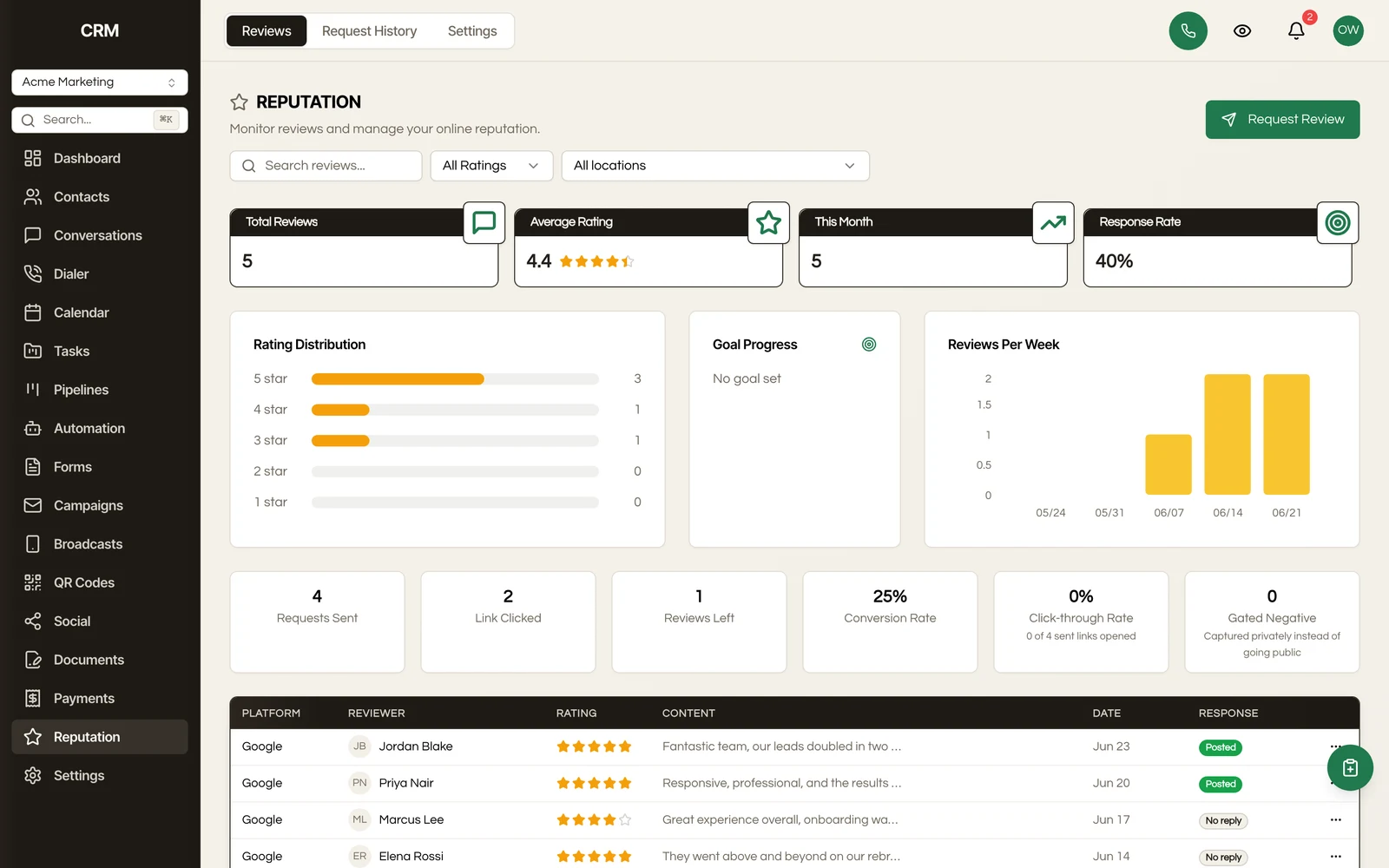
The reputation dashboard gives you a consolidated view of your reviews across all connected platforms. At the top you see your average rating, total review count, and recent trends. Below that, the review list shows individual reviews with their source, rating, content, and response status.
Review Sources#
Reputation pulls reviews from the platform you connect:
- Google Business Profile - Reviews from Google Search and Maps
Connect your Google Business Profile in Settings → Integrations. Once connected, reviews are synced automatically and appear in your reputation dashboard. Reviews that were already on Google when you connect a location are imported quietly, without starting review workflows or sending review notifications; only reviews posted after that do.
Review List#
The review list displays all reviews across your connected sources in one place. Each review shows:
- Star rating
- Reviewer name
- Review text
- Date posted
- Source platform
- Whether you have responded
Filter the list by source, star rating, date range, or response status to focus on the reviews that need your attention. Unresponded negative reviews are easy to spot so you can prioritize them.
Responding to Reviews#
Click a review to open its detail view. From there, you can compose and publish a response directly through the platform. For Google reviews, your response is posted to your Google Business Profile. If it cannot be posted, for example because Google Business Profile is not connected with review access or no location is selected, the reply is still saved in the CRM and the review shows Failed to Post with the reason.
Responding to reviews - especially negative ones - shows potential clients that you are engaged and care about the customer experience. A prompt, professional response can turn a negative review into a positive impression.
Review Requests#
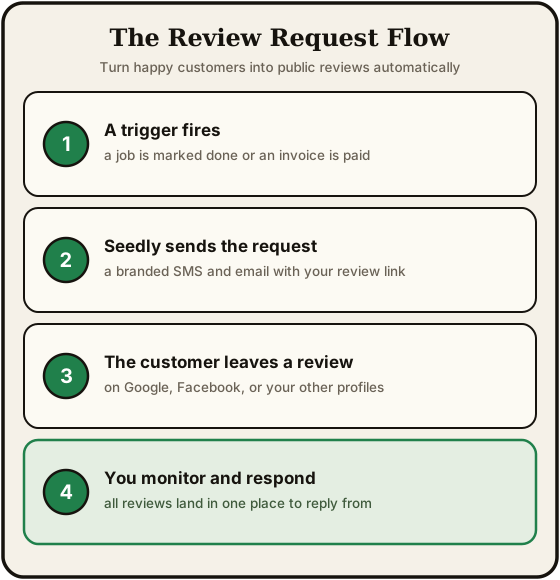
Proactively ask satisfied clients to leave a review. You can send review requests via:
Email Requests#
- Go to the Review Requests section
- Select one or more contacts
- Choose which platform you want reviews on (e.g., Google)
- Customize the message if needed
- Click Send
The email includes a direct link to leave a review on the selected platform, reducing friction for the client.
SMS Requests#
The same flow works for SMS. Select contacts with phone numbers, choose the platform, and send a short message with the review link.
Automation#
You can also send review requests through Workflows. For example, trigger a review request automatically when an opportunity is marked as Won, or a set number of days after an appointment is completed.
Smart Gate#
Review-request links do not have to go straight to the review platform. With Smart Gate enabled, the link in a review request opens a star-rating page first:
- A high rating sends the customer on to leave a public review
- A low rating opens a private feedback form instead, so you hear about the problem directly
Either way, the rating (and any feedback text) is recorded on the review request, so the request history shows what happened after the click.
The private feedback form still offers a link to leave a public review, so an unhappy customer is never prevented from reviewing you publicly - the gate routes, it does not block.
Settings#
Smart Gate is configured in the Reputation settings:
- Enable Smart Gate - the master switch, on by default. Switched off, review-request links go directly to the review platform.
- Gate threshold - the star rating (1 to 5) that counts as happy. Ratings at or above the threshold go on to the public review page; ratings below it get the private feedback form. The default is 4, and setting it to 1 effectively disables gating.
- Private feedback - can be switched off; low ratings are then sent on to the public review page like everyone else.
- Thank-you message - shown after private feedback is submitted; customize it or keep the default.
- Appearance - show or hide your logo and business name on the gate page, and apply one of your saved style presets so the page matches your brand.
When someone submits private feedback, a notification goes to the teammate you pick in settings, or to an admin if you have not picked one, so negative feedback gets seen rather than sitting in a list.
Review Destinations#
Add up to five review destination URLs - one per business location, or one per review platform. With two or more filled in, a customer who picks a high rating sees a button list and chooses where to leave their review; with one, they are sent straight there. You can pick a connected Google Business Profile location to fill in a destination's label and review link automatically, or paste any review URL by hand. If no destination is configured, a happy customer simply sees a thank-you instead of being redirected.
Embedding the Gate on Your Website#
Smart Gate also works as an embeddable card on your own website, so you can collect ratings and feedback from site visitors, not just from review requests. Click Copy embed code in the Reputation settings and paste the snippet into your site. The embedded card resizes itself to fit the page, and because there is no review-request link involved, submissions from it arrive without being tied to a specific contact.
Multiple Business Locations#
You can connect more than one Google Business Profile location, and each one syncs and tracks its own reviews:
- The dashboard gains a location filter when more than one business is connected, so you can look at one storefront's reviews at a time
- When sending a review request, choose which connected business the request points to
- Smart Gate's review destinations can list one review URL per location, so the customer picks the storefront they actually visited
- A location can be connected to one sub-account at a time. In the location picker, a location already in use by another sub-account is greyed out and says so; if a location you already have is also connected elsewhere, a warning on the Google Business card says which sub-account its reviews sync to
- To delete a location's synced reviews, untick the location first; deleting is not available while it is still connected
Analytics#
The reputation analytics section tracks your review performance over time:
Average Rating#
Your overall average rating across all connected sources, along with a breakdown by platform. Track whether your average is trending up or down over the selected period.
Review Volume#
The number of new reviews received per period - daily, weekly, or monthly. A healthy review volume shows that you are consistently generating feedback from clients.
Trends#
Visualize your review history over time with charts showing:
- Rating distribution (how many 5-star, 4-star, 3-star, etc.)
- Review volume by month
- Response rate - the percentage of reviews that have a reply, including replies written directly on Google
- Average rating trend over time
Use these trends to spot patterns. A sudden drop in average rating might signal a service issue that needs attention. A rise in volume after sending review requests confirms that your outreach is working.
Summary#
| Feature | Detail |
|---|---|
| Sources | Google Business Profile |
| Review list | All reviews in one place, filterable by source, rating, date, and response status |
| Responding | Compose and publish responses directly to Google Business Profile |
| Review requests | Send via email or SMS with a direct link to the review platform |
| Smart Gate | Happy customers routed to your public review page, unhappy ones to a private feedback form; embeddable on your own site |
| Locations | Multiple Google Business Profile locations, each with its own reviews, filter, and review link |
| Automation | Trigger review requests from workflows |
| Analytics | Average rating, volume, rating distribution, response rate, and trends over time |