The reason I love Seedly is ownership. You own the codebase instead of renting and watching the provider change things constantly.
Owns the codebase
Conversations
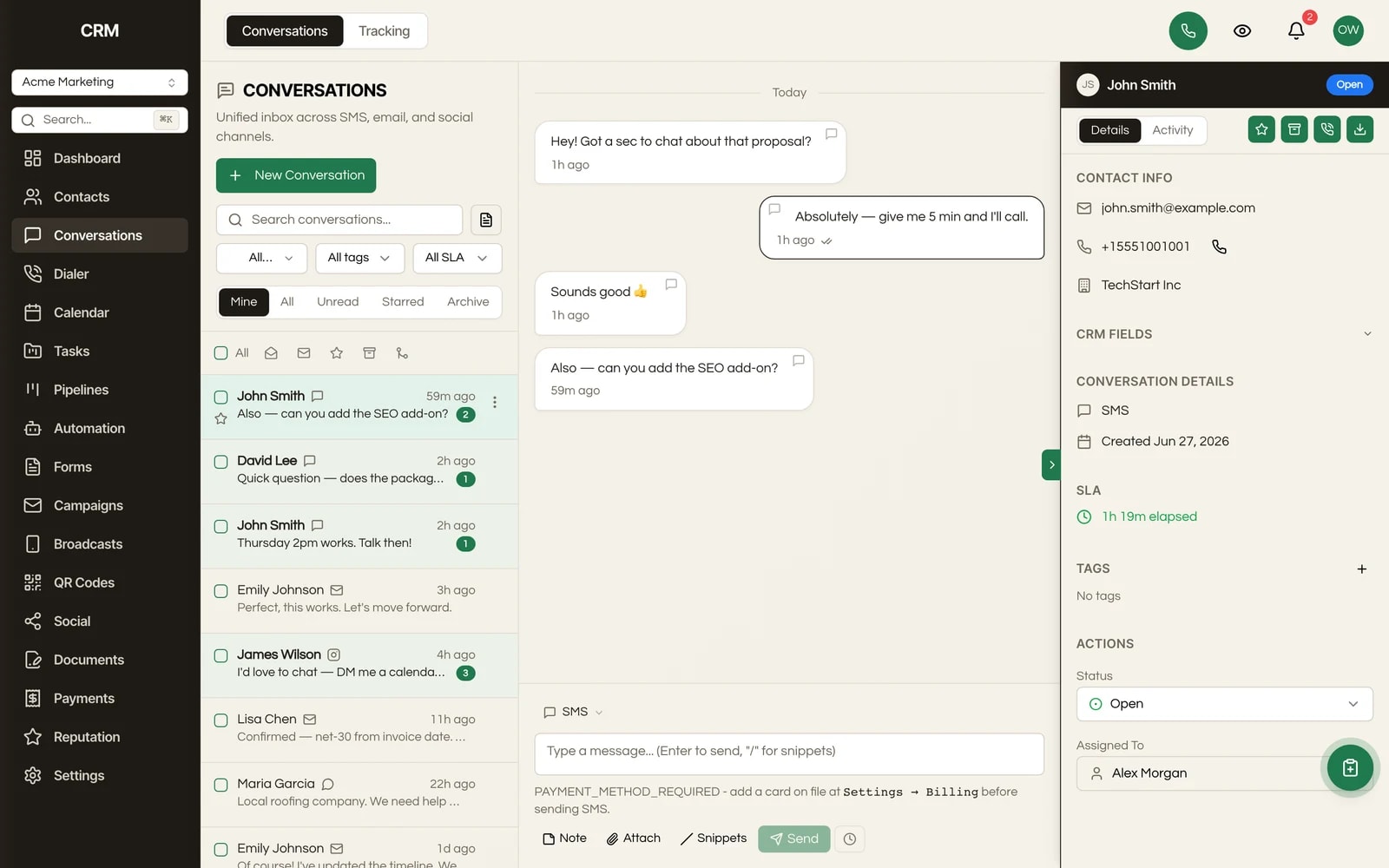
SMS, email, Gmail, Facebook Messenger and Instagram DM land in a single threaded view per contact, so your team stops switching apps to answer a customer.
One payment. Full source code. Unlimited seats, every client, forever.

Don't take our word for it. Take theirs.
Early Seedly owners, in their own words. Every review verified on Trustpilot.
What It Does
SMS, email, Gmail, Facebook Messenger and Instagram DM all appear in a single timeline tied to the contact, not scattered across separate apps or separate per-channel inboxes. Your team reads the whole relationship in one place.
New messages, status changes and unread counts stream in live to every open screen. No polling, no manual refresh, no reload to see new replies. Two teammates looking at the same inbox always see the same thing.
Seedly is source code you own and run on your own provider accounts: your Twilio or Telnyx number, your Gmail, your Meta connection. There is no per-conversation or per-seat surcharge layered on top. You pay your provider for the message, and nothing to us per thread.
Watch each outbound message move through pending, sent, delivered and read. A failed SMS shows a plain-language reason instead of failing silently, and you get a heads-up before sending a text that would land inside the recipient's quiet hours.
Save quick-reply templates and drop them into any reply, and compose formatted email with links, lists and formatting right in the thread instead of bouncing to a separate mail app.
Assign a conversation to a teammate, set it Open, Closed or Snoozed with an automatic reopen timer, and track first-response time against response targets you configure on the Tracking tab, with breach notifications.
Schedule a message to send later, search and filter the list by channel, status or assigned user, and merge duplicate conversations into one clean thread. A contact sidebar shows the full contact card, timeline and metadata next to the conversation.
How It Works
When a contact texts your number, emails you, or sends a Facebook or Instagram DM to a connected account, the message is matched to that contact and dropped into their thread. A unified inbox is simply a single screen that collects every message a client sends you, no matter which channel it came in on.
The inbox is laid out in three panels: a list of conversations on the left, the open message thread in the middle, and the contact's details on the right. Your team works the list top to bottom, opening each conversation and reading the whole history regardless of channel.
Reply from the same box: pick a saved snippet to answer common questions fast, or write a formatted email for longer replies. Assign the conversation to whoever owns it, set its status, and the inbox tracks how quickly you responded.
Status changes, new replies and unread counts update in real time, so two teammates looking at the same inbox always see the same thing. No refresh, no stale view.
The Rest Of The Garden
Every module ships in the same source code you own. Slide through the rest of the garden.
FAQ
SMS, email, Gmail, Facebook Messenger and Instagram DM all flow into the same threaded inbox. Inbound calls and CallRail activity also surface against the contact, so the inbox doubles as the contact's full communication history.
Yes. Messages are tied to the contact, so a text, an email and a social DM from the same person appear in one timeline rather than three separate conversations. You can also merge duplicate threads if a contact came in through two channels before being matched.
Yes. Any conversation can be assigned to a team member, and you can filter the inbox by assigned user. You can also set status (Open, Closed, Snoozed) and track first-response time against targets you define.
Yes. Every sub-account has its own isolated inbox with its own connected channels, so one client's messages never mix with another's. Your team runs them all from a single install.
No. Seedly is sold as source code you own and self-host with unlimited seats. You connect your own messaging providers and pay them directly for what you send. There is no metered charge per conversation or per user from us.
Yes. The composer adapts to the channel: a rich-text editor for email, plain text for SMS, with snippets available on both. You can schedule a message to send later, and the inbox warns you before an SMS would land during the recipient's quiet hours.
Because you own the code, yes. The current channels cover SMS, email, Gmail and Meta's Messenger and Instagram. Anything beyond that is a code change you control, not a feature request to a vendor.
You can import your contacts and their history into Seedly, and new messages start threading immediately once your channels are connected. Many teams treat the move as a chance to clean up the conversations they inherited.

One-time payment. No subscriptions. No renewals.
Secure checkout via Stripe. Your license key is emailed instantly.