
Most GoHighLevel migrations do not fail because the destination CRM is missing features. They fail because moving off is a bigger project than most agencies budget for, and the pieces that break the timeline are almost never the ones people plan around.
The CRM part is straightforward. You license Seedly, deploy it on infrastructure you control, and you have a CRM. Every other piece is what actually eats the calendar. The data, and specifically the years of conversation history sitting inside GHL's message store. The phone numbers that customers already call and text. The OAuth apps that make Google Calendar, Google Ads, Google Business Profile, Outlook, and Zoom feel native. The workflows you built over months that nobody has fully written down. All of it has to move without your clients noticing.
If you are early in evaluating a move, this covers the whole picture. Each section links to the dedicated guide for the piece it covers.
Join the Seedly owners community.
Owners trade setups, share add-ons, and swap playbooks. See what people are building before you commit.
What migrating from GHL actually involves
Here is the full map. Skip to the section you care about, but do not underestimate the ones you skip. The migrations that succeed treat every item on this list as its own project.
- Data. Contacts, deals, notes, tasks, tags, custom fields, and the entire conversation archive across SMS, email, Messenger, Instagram, live chat, and call records.
- Phone numbers. The numbers on business cards, trucks, yard signs, and Google Business Profile listings. Includes A2P 10DLC registration so texts actually deliver.
- OAuth integrations. Verified apps with Google, Microsoft, and Zoom so calendars sync, ad campaigns report, GBP reviews come through, and Zoom meetings create themselves.
- Workflows and automations. The lead capture sequences, follow-up cadences, review requests, appointment reminders, and pipeline automations that run your business.
- Optional: documentation. A written or visual record of what your old GHL account did, useful if you are moving multiple client sub-accounts or handing operation to a new team.
The order the migration is executed in matters. Data first, then phone numbers and OAuth in parallel so their long clocks run at the same time, then workflow rebuilds against the live data, then final verification. The playbook at the bottom of this post walks the sequence.
The data problem, in detail
Every DIY GHL migration hits the same wall at roughly the same time.
Contacts export cleanly. GHL's UI gives you a CSV, Seedly ingests it, and every contact carries its custom fields and tags across without much drama. Deals map to opportunities in a few clicks. Notes and tasks come with them. You feel like you are 80% done.
Then you try to bring across the conversation history. SMS threads with years of client back-and-forth. Email chains attached to specific deals. Facebook Messenger and Instagram DMs. Live chat transcripts that live inside GHL's own inbox. The metadata for calls that went through GHL's telephony. None of this is in GHL's normal contact export in any shape you can actually reuse. And you cannot leave it behind, because it is the record every future customer conversation refers back to.
Rebuilding the archive by hand is not a weekend project. Every conversation has to be threaded to the right contact, timestamped to the actual moment it happened, and marked with the channel it came from. Miss any of that and search becomes useless and reporting is a lie.
That is the wall most agencies stall on. Either they give up and stay on GHL for another quarter, or the migration turns into a paid engagement with somebody who has done it before.
GoSeedly moves the data
GoSeedly is a self-run migration kit from DevLaunch (operated by Hypercat Studio LLC, independent of both Seedly and HighLevel). You buy the source code once for $197 at launch, code CULT gets you 10% off, and you run the whole migration on your own machine. Nothing leaves your computer, and you keep the code for every subsequent sub-account.
What it actually carries into Seedly
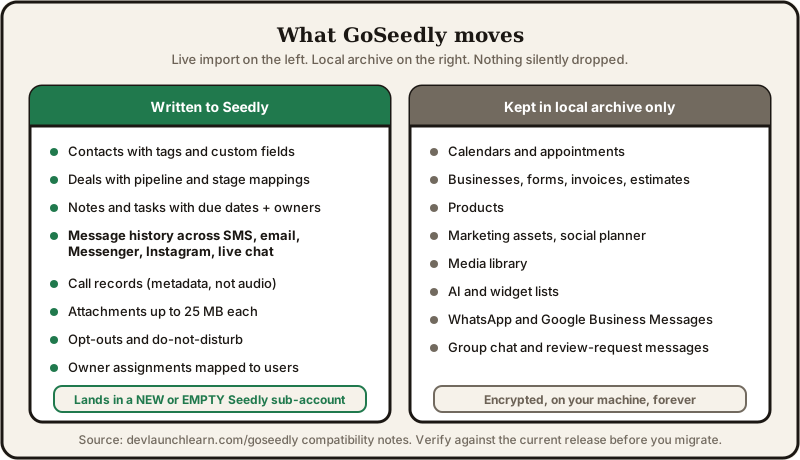
Everything the base importer handles.
- Contacts with names, emails, phone numbers, addresses, tags, and custom fields (values are mapped to the equivalent Seedly custom fields you have configured)
- Deals with statuses and pipeline / stage mappings
- Notes and tasks with due dates and ownership
- Message history across SMS, email, Facebook Messenger, Instagram, and live chat
- Call records (historical metadata, not the audio itself)
- Attachments up to 25 MB by default per file
- Opt-outs and do-not-disturb restrictions
- Owner assignments mapped to your existing Seedly users
Everything captured but archived locally rather than force-imported into Seedly.
- Calendars and appointments
- Businesses, forms, invoices, estimates, products
- Marketing assets, social planner data, media library
- AI and widget lists
- WhatsApp and Google Business Messages (Seedly does not yet import those channels)
- Group chat and review-request messages
The distinction matters. GoSeedly does not silently drop the archived categories, they land in an encrypted local archive so you have them if you ever want to reference or process them further. What crosses into your live Seedly is the record set that behaves the same on the other side.
The four phases
- Export. Connect via OAuth or a Private Integration Token, choose the sub-account and the categories you want, save readable records to an encrypted local archive.
- Clean up. Review duplicates, tidy up fields and tags, decide what is worth keeping. This is the step DIY exports skip and it is the reason DIY exports produce a messy Seedly.
- Preview. Run a dry-run of the import. Every conflict, every unsupported field, every exclusion is shown before anything writes.
- Import and verify. Land the supported records, check what arrived and what got skipped, fix anything that needs attention.
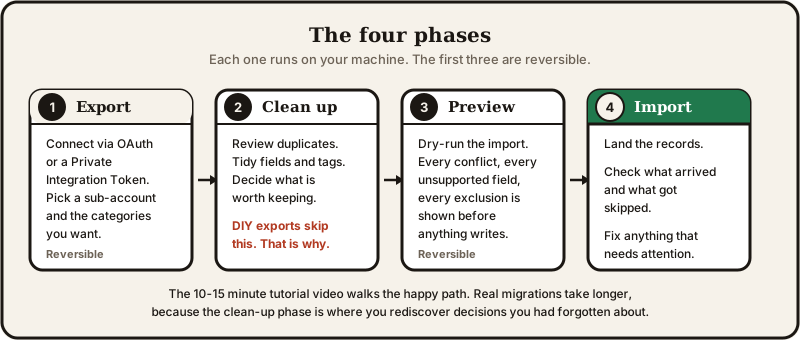
The 10-15 minute tutorial video walks the happy path. Real migrations, especially the first sub-account, take longer because of the clean-up and verification phases, which is where you catch and fix decisions made years ago you had forgotten about.
What you need before you run it
- A licensed Seedly deployment on infrastructure you control, with the kit's historical-import add-on installed
- A new or empty Seedly sub-account per migration job (no populated-account merges)
- Destination pipelines, stages, and users pre-configured in Seedly
- Authorized HighLevel access via a private OAuth app or a Private Integration Token
- A computer able to run code locally, storage for the encrypted export, and your own backup approach
Phone numbers, the other thing that breaks migrations
The number your customers already call is the second-biggest thing that stops people from moving. It should not be, because Twilio ports and LC Phone transfers are boring plumbing at this point, but agencies get scared into staying on GHL over exactly this fear.
There are three situations and each has a different fix.
- Numbers are already on your own Twilio account. Disconnect GHL, reconnect Seedly, done in five minutes.
- Numbers are on GHL's LC Phone platform. GHL's own support handles the transfer in a couple of days via a support ticket.
- Numbers are with an outside carrier. Traditional porting through the carrier takes 2 to 4 weeks, sometimes longer.

The phone number migration guide walks each situation in detail and, more importantly, the sequence. Build your Twilio infrastructure and register the A2P 10DLC brand and campaign BEFORE the numbers land, or you will port successfully into an account that cannot send a text. Every skipped step here surfaces as clients thinking their business phone stopped working.
If the numbers are with an outside carrier, kick the port off on day one of the migration. The 2-4 week clock will run in parallel with everything else.
Authentication and OAuth, the piece nobody warns you about
The version of GHL you were using had one verified OAuth app per provider, shared across every customer. On your own Seedly, you have two options. File your own verified apps with Google, Microsoft, and Zoom (weeks of paperwork per provider, D-U-N-S numbers, MPN membership, project allowlisting, marketplace listings), or use a managed OAuth broker.
Filing your own is real work.
- Google's sensitive-scope review is a 2 to 4 week cycle and rejects easily.
- Microsoft Publisher Verification needs a D-U-N-S number and an MPN Partner Global Account.
- Google Business Profile API allowlists exactly one Cloud project per company.
- Google Ads needs a developer token and, for real volume, Standard Access on top of Basic.
- Zoom Marketplace has its own review track for a publishable app.
None of this fits inside a migration window if you are moving an active agency.
CRMLynk is the managed OAuth layer I built for exactly this. One verified app per provider (Google, Microsoft, Zoom, all approved), your Seedly deployment plugs into it with two environment variables, every provider works immediately. Starter is $49/mo up to 30 connected accounts, Growth is $99/mo up to 100. Users skip the "unverified app" warning, you skip filing paperwork.
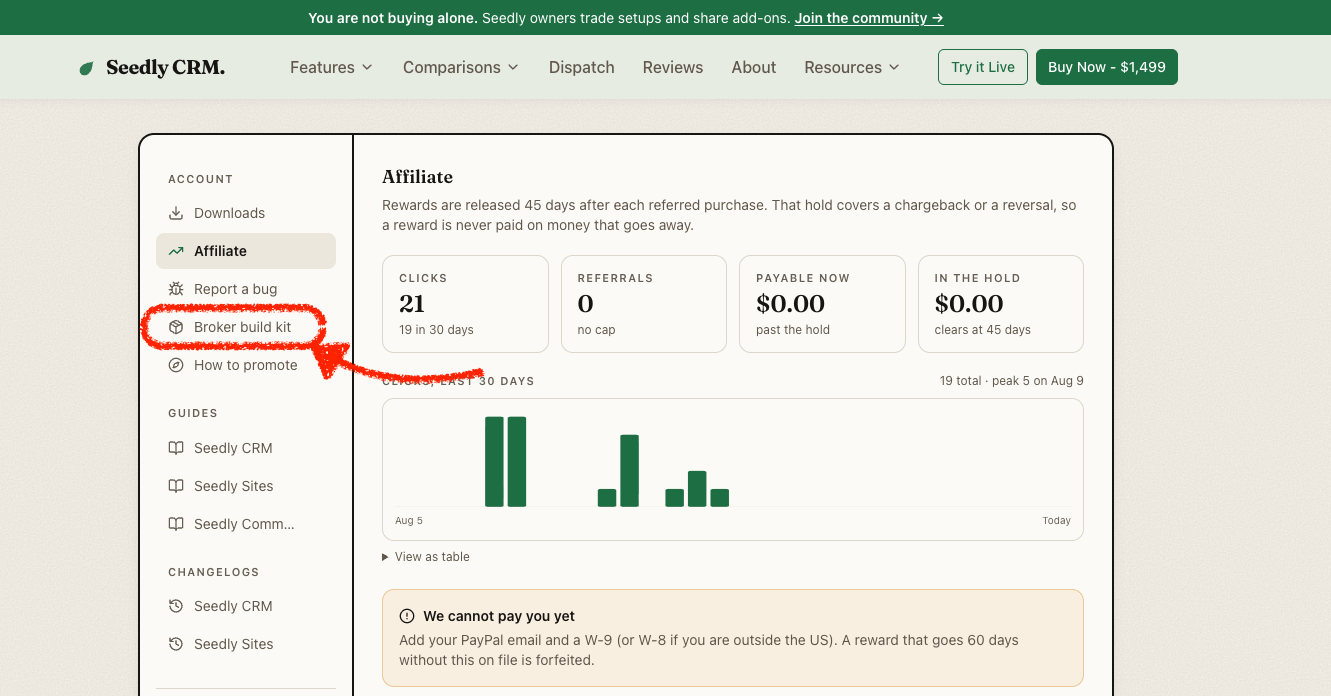
Treat CRMLynk as a stepping stone, not a permanent part of your stack. You own the CRM code, so you should own the OAuth alongside it eventually. Every Seedly CRM license includes a free "Broker Build Kit" in your account portal, which is the full playbook for building your own OAuth broker end to end (per-provider approval walkthroughs, per-scope video shot scripts, legal doc templates, and every gotcha I hit taking CRMLynk through review). Use CRMLynk to unblock now, use the kit to graduate when you have a week to build.
Sign up at crmlynk.com/subscribe.
Workflows and automations
Seedly's workflow engine covers 80 node types and 76 triggers, which spans what most GHL accounts actually do. Lead capture, drip sequences, appointment reminders, review requests, pipeline automations, conditional branching on custom fields, webhooks to external services. The mechanics differ from GHL's editor but the primitives translate.
The mistake most agencies make is trying to migrate every workflow. Log into your GHL sub-account and look at what is actually running right now. Most accounts have a handful of automations doing real work and a graveyard of experiments nobody remembers building. Rebuild the ones actually firing, leave the rest behind.
Rebuild those in Seedly against the live migrated data. This is where you catch the automations that referenced custom fields you renamed, or triggered on tags that were never really being applied. It is faster than most people expect because you are not designing new automations, you are transcribing verified ones.
Documentation, the optional finishing touch
If your GHL account is complex enough that you cannot fully explain it out loud, or you are moving dozens of sub-accounts for clients, PatchyHub is worth an afternoon before you touch anything. Drop your GHL snapshot in and you get a visual map of every workflow, funnel, custom field, and automation, plus how they connect. It surfaces the "oh right, this workflow fires a webhook that updates a field that triggers another workflow" chains you would otherwise miss.
The PatchyHub links in this post carry my referral code.
Skip PatchyHub if you already know what you built and the account is straightforward. It shines on complex handoff scenarios, not on solo agency accounts you designed yourself last month.
The playbook, in order
The sequence that actually works for a single sub-account.
- Set up Seedly CRM. License, deploy on infrastructure you control, configure your users. About a day, and the real cost numbers are here if you want to know what running it costs.
- Sign up for CRMLynk and set the two env vars. OAuth integrations start working immediately, before you have any data or workflows to test them against.
- Kick off phone number migration. If numbers are with an outside carrier, start the port now because the clock is 2 to 4 weeks. Follow the phone number guide.
- Optional: run the GHL sub-account through PatchyHub. If it is complex, do this before GoSeedly so you have a documented spec of what you are moving.
- Buy GoSeedly. $197 at launch, code
CULTfor 10% off. Install and read the compatibility guide. - Prep the destination sub-account in Seedly. New, empty, with your pipelines, stages and users pre-configured, and the historical-import add-on installed.
- Run GoSeedly's four phases against the first sub-account. Export, clean up, preview, import. Spot-check each phase before advancing.
- Rebuild the workflows that actually fire. Look at what has actually run in your GHL account recently, transcribe those into Seedly against the migrated data, ignore the rest.
- Verify end to end. Log in as a client, book an appointment, send a message, run a workflow, check that a Google Calendar event lands, that a Zoom meeting creates, that an ad report renders, that a text delivers. Fix what does not.
- Cut over. Update whichever forwarding, webhooks, or client-facing URLs still point at GHL. Announce the change to your team the day it happens, not the day before.
- Repeat for each remaining sub-account. GoSeedly is a re-run, not a re-purchase.
- When you are ready, plan the CRMLynk graduation. Open the Broker Build Kit in your Seedly account portal when you have a week to build your own OAuth broker.
How long the whole thing takes
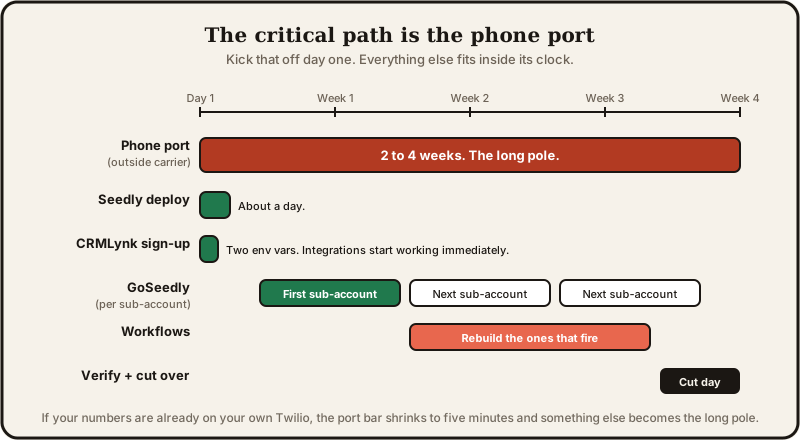
The full move takes as long as your slowest piece, and that is almost always the phone port. If your numbers sit with an outside carrier, the port itself is 2-4 weeks, which sets the outside limit on the whole migration. LC Phone transfers run days. If your numbers were already on your own Twilio, the phone piece is a five-minute change and something else becomes the long pole.
Everything except the phone port can run in parallel with everything else. Kick the port off on day one, sign up for CRMLynk the same afternoon so integrations are ready before you have data to test them against, then work through data and workflows while the port clock runs. The clean-up phase inside GoSeedly is the part that surprises people, because it is where you rediscover decisions you had forgotten about, so give the first sub-account more clock time than you think you need and the subsequent ones will move faster.
Common pitfalls
- Trying to migrate every workflow. Most of what is in your GHL account is not really running. Rebuild only the ones that actually fire.
- Porting numbers into a Twilio account with no A2P registered. Texts start failing silently. Register the brand and campaign first.
- Filing your own Google, Microsoft and Zoom OAuth in parallel with the migration. You will not finish in time. Use CRMLynk to unblock, graduate later.
- Merging GoSeedly output into a populated Seedly sub-account. The kit is explicit that jobs land in a NEW or EMPTY sub-account. Merges corrupt everything.
- Announcing the cutover the day before it happens. Announce the day of, once you have verified. Give clients and staff nothing to worry about until the migration has actually worked.
- Trying to keep two systems running in parallel indefinitely. Pick a cutover date per sub-account. Two systems means two truths and nobody knows which one is right.
Next steps
- Grab GoSeedly, code
CULTfor 10% off at launch - Move your phone numbers without losing one
- Sign up for CRMLynk so OAuth integrations work on day one
- Compare what Seedly CRM includes vs. what you're paying for GHL
- See the real hosting costs for a self-hosted CRM
- Get PatchyHub free if you want a visual map of what you're leaving behind