A $27,212.50 custom development project was successfully delivered to a client with Seedly as the foundational building block, about 60 hours of development time and $200-300 of Claude Code credits.
Delivered a $27k build on it
Join the Seedly owners community →You are not buying alone. Seedly owners trade setups and share add-ons. Join the community →
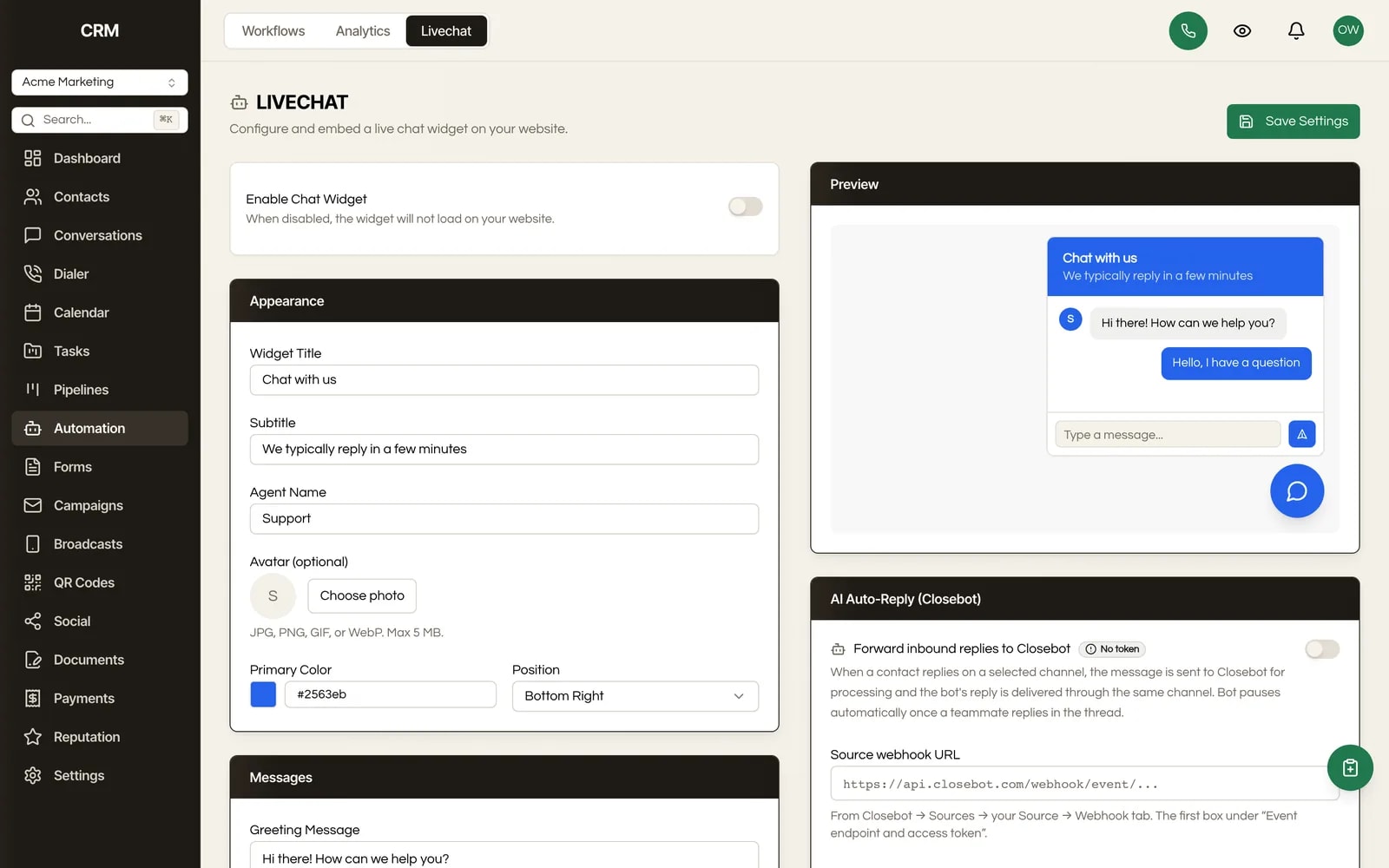
A branded bubble on their website, threading into the same inbox as SMS, email and social. Every visitor who types becomes a contact in the CRM you own.
Real product UI · shot coming

One payment. Full source code. Unlimited seats, every client, forever.
Don't take our word for it. Take theirs.
Every review 5 out of 5 on Trustpilot. These are agency owners who made the same $1,499 decision you are weighing, in their own words.
Read every review →What It Does
The widget is built to be embedded cross-origin, so it goes on a client's WordPress site, their Squarespace page, a landing page you did not build, or a site another agency maintains. You are not asking anyone to migrate their website to get chat on it.
Each sub-account has its own widget with its own greeting and its own avatar, uploaded by you. Ten clients means ten differently branded widgets from one CRM, which is the difference between a tool you resell and a tool you happen to use.
It sits in the corner as a bubble and opens when someone taps it, rather than throwing a panel over the page on arrival. The pattern is the one every visitor already understands, so nothing has to be explained.
A conversation from the widget threads into Conversations beside that contact's SMS, email, Messenger and Instagram. Your team does not watch a separate chat console, and the history of a customer is one history rather than one per channel.
Chat can identify the person typing, so an anonymous visitor turns into a contact record with the conversation already attached. That is the whole point of chat living in a CRM rather than in a standalone chat product: the conversation is the beginning of a relationship you can then work.
Connect an AI bot platform and it can reply on live chat, and on five other channels alongside it. The moment a human on your team replies, the bot stands down for that conversation permanently, so a customer never gets a person and a robot talking over each other.
A chat is a channel like any other, so the workflows, assignment rules, SLA targets and notifications you already built apply to it. Nothing about chat is a special case that needs its own parallel setup.
Chat tools are usually priced per seat, per conversation, or per website. You own this one. Add the eleventh client site and it costs what the tenth cost, which is nothing.
How It Works
Give the sub-account's widget its greeting and upload an avatar so it looks like the client's business rather than yours or ours.
Drop the embed onto their website. It is built to run cross-origin, so it works on a site you do not host and did not build.
Chats arrive in Conversations next to that contact's other channels. Assign them, track them against your SLA targets, and let your existing notifications reach whoever is on duty.
An identified visitor becomes a contact with the conversation attached, so the chat is the start of a CRM record you can segment, automate and sell to.
Intercom, Drift, Tidio and the rest charge per seat, per conversation, or per website, which means the cost of putting chat on your clients' sites scales exactly with your success at signing clients. Agencies usually respond by putting chat on nobody, or by charging for it separately and hoping the client does not compare prices.
This one is inside the CRM you already bought. There is no per-conversation meter in the code, so ten client sites cost the same as one, and you can fold chat into a retainer as an included extra rather than a line item you have to defend.
The bigger difference is where the conversation goes. A standalone chat tool leaves you with a transcript in a separate product, and somebody has to copy the useful part into the CRM or it is lost. Here the chat IS in the CRM: it threads with the contact's other channels, it can turn a visitor into a contact, and every automation you have already built applies to it without a connector.
You own the chat. Put it on every client site, answer it in one inbox, pay nothing per conversation.
The Rest Of The Garden
Every module ships in the same source code you own. Slide through the rest of the garden.
FAQ
Yes. The widget is designed to be embedded cross-origin, so it runs on a client's WordPress, Squarespace, Wix or custom site regardless of who maintains it. Nobody has to move their website to get chat on it.
Yes. The widget belongs to the sub-account, with its own greeting and its own uploaded avatar, so every client's chat looks like their business rather than yours.
In Conversations, threaded next to that contact's SMS, email, Messenger and Instagram. There is no separate chat console to keep an eye on, which is the single most common reason chat goes unanswered.
No. You can connect an AI bot platform to answer on chat and five other channels. When a human on your team replies, the bot stands down on that conversation permanently, so a customer is never handled by both at once.
It can. Chat supports identifying the visitor, which turns an anonymous person on a web page into a contact record with the conversation already attached, ready for your segments and workflows.
Nothing. There is no per-conversation, per-seat or per-website charge anywhere in the product, because you bought the source. That is the entire difference between this and every hosted chat tool you have priced.

One-time payment. No subscriptions. No renewals.
Secure checkout via Stripe. Your license key is emailed instantly.