Contracts

Documents and e-signatures, built into a CRM you own

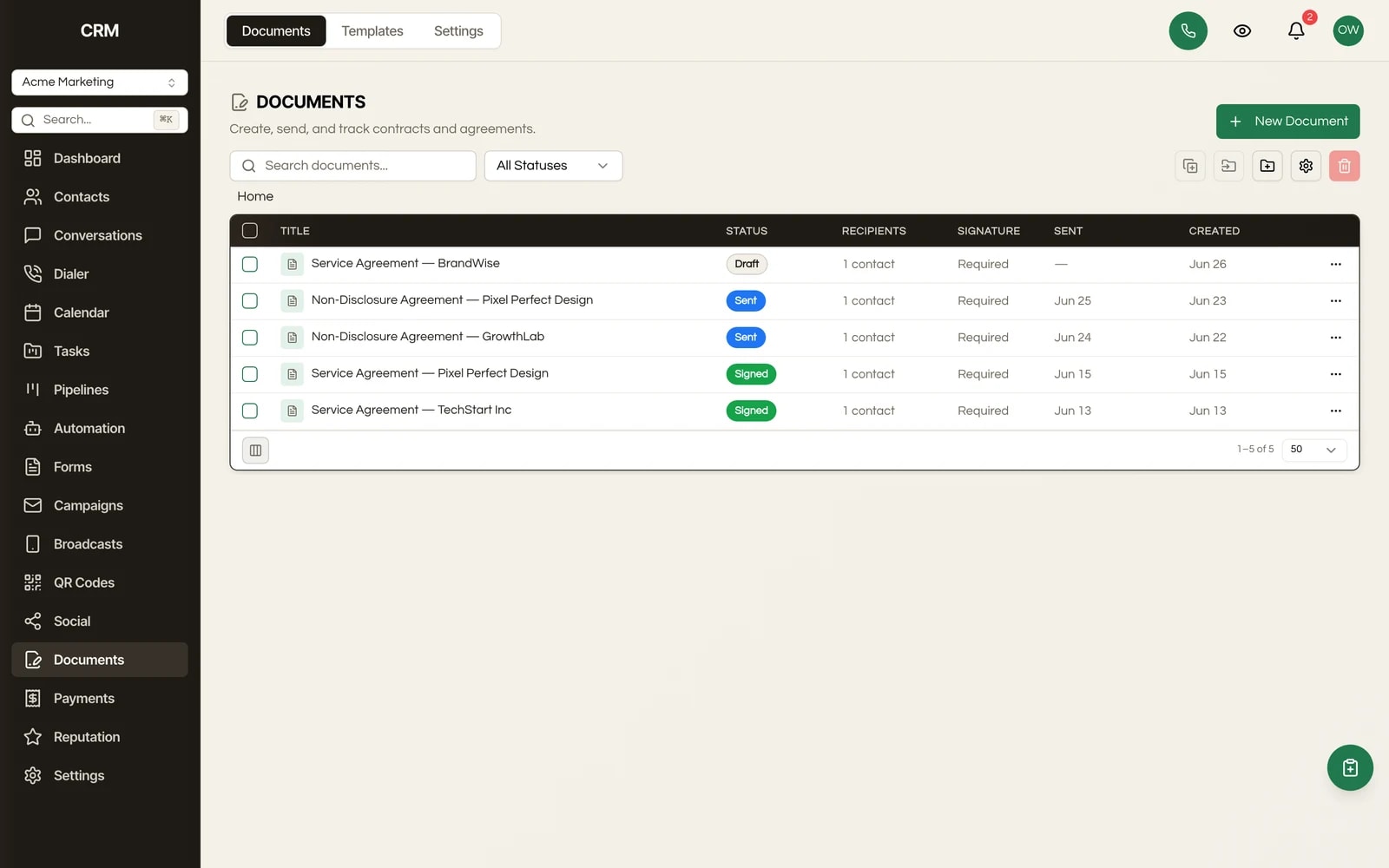
Draft a contract from a template, send it for signature, collect payment on signing, and watch the signed values flow straight back into the contact record. No per-envelope bill.

JL
MG
RD
AB
AR
Rated 5/5 on Trustpilot by early owners

One payment. Full source code. Unlimited seats, every client, forever.

crm.youragency.com/documents
Documents & E-Sign in the Seedly CRM

Seedly CRM Testimonials: The Receipts

Don't take our word for it. Take theirs.

Early Seedly owners, in their own words. Every review verified on Trustpilot.

Verified · Trustpilot
The reason I love Seedly is ownership. You own the codebase instead of renting and watching the provider change things constantly.
Joshua LockhartJun 26, 2026

Owns the codebase

Verified · Trustpilot
Buying from someone I didn't know was a bit of a leap of faith. Would he actually deliver? I've been pleasantly surprised. Andrew has been fair, and sometimes more than fair.
Matt GordonMay 23, 2026

Migrated from HighLevel

Verified · Trustpilot
I'm a long-time GHL user. Support is a nightmare. With Seedly, I am the support. I am my own headache or genius.
Rain DelawareMay 22, 2026

Long-time GoHighLevel user

Verified · Trustpilot
You get the entire code base. So you can just use Claude to add features or customize it any way you want.
Aaron BurlesonMay 26, 2026

Full source owner

Verified · Trustpilot
Seedly frees you from the massive CRM conglomerates and lets you customize it the way YOU want it. Andrew built a tool that grows with you and doesn't lock you in.
Aaron RountreeMay 23, 2026

Agency owner

Every review, 5 out of 5.

Read all reviews on Trustpilot ->

What It Does

Everything this module gives you, in the same source you own.

Merge fields that auto-fill

Insert tokens for contact fields like name, email, company, title, and address, plus your business details, and they resolve automatically when the document renders. No copy-paste, no wrong names on contracts.

Multi-recipient e-signature with signing order

Send one document to several recipients, give each a signer or viewer role, assign specific fields to each party, and choose parallel signing (everyone at once) or sequential (one after another in order). Each recipient gets their own private signing link.

CRM write-back on signed fields

Fields a client fills in while signing can be bound to a contact custom field or deal field and written straight back into the CRM record when they sign. The contract is not a dead PDF; it updates your data.

Block-based document builder

Compose contracts and agreements from drag-and-drop blocks: text, images, tables, dividers, buttons, plus input fields (text, date, initials, checkbox, dropdown, radio, signature). Global styling controls fonts, colors, and spacing across the whole document.

Template library with folders

Save any document as a reusable template, organize templates in folders, and spin up a new document from one in a click. Build your MSA, proposal, and onboarding agreement once and reuse them forever.

Collect on Sign

Attach a payment to a document and collect it from the recipient at the moment they sign, through your own connected Stripe. Sign and pay in one flow.

Audit trail and downloadable certificate

Every view and signature records IP address and timestamp, and the system produces a signer-history audit certificate with a content hash, available to both you and the signer via a secure link.

Document flows

Chain documents into a multi-step sequence, for example agreement then estimate then invoice, that a client moves through in order from a single link.

Pricing tables and calculated fields

Drop in a pricing table with line items, quantities, and tax, or a formula field that calculates a value from other inputs. File-upload fields let a signer attach a document back to you.

PDF, reminders, and version history

Completed documents generate a downloadable PDF, unsigned recipients get automatic signing reminders, and every edit is captured in version history so you can see what changed.

How It Works

In plain English.

1

Build the document like a landing page

You build a document the way you build an email or a landing page: drag blocks onto a canvas, type your contract language, and drop in the fields you need a client to complete, like a signature box, a date, or an 'I agree' checkbox. You can save it as a template and reuse it.

2

Assign fields and send

When you are ready, you pick the contact, assign each field to the person who should fill it, and send. The client gets an email with a link to a public signing page.

3

The client signs from any device

They open it on a phone or laptop, no account required, fill in their fields, draw or type their signature, and submit. As they go, the system records when they viewed it, when they signed, and from what IP address.

4

It files, writes back, and collects

Once everyone has signed, Seedly generates the final PDF, files it on the contact, writes any bound field values back into your CRM, and can collect a payment and kick off an automation. You get a signed contract and an audit certificate; the client gets a copy.

The Rest Of The Garden

It is one CRM, not a stack of subscriptions.

Every module ships in the same source code you own. Slide through the rest of the garden.

FAQ

Questions, answered.

Are the electronic signatures legally binding?

Seedly captures what electronic signature laws like the US ESIGN Act and UETA look for: the signer's clear intent to sign, the signature itself, and a record of the event. Every signature is stamped with a timestamp and IP address, the full signer history is logged, and the system produces a downloadable audit certificate with a content hash so the signed document can be shown to be unaltered. As with any e-signature tool, whether a specific document is enforceable depends on your jurisdiction and use case, so treat this as strong record-keeping rather than legal advice.

Do my clients have to create an account to sign?

No. Each recipient gets a private link to a public signing page they can open on any device. They fill in their fields, sign, and submit without logging in or installing anything.

Can I build documents from templates instead of from scratch?

Yes. Save any document as a template, organize templates in folders, and create a new document from one whenever you need it. Merge fields fill in the contact and business details automatically, so a template becomes a finished, personalized contract in seconds.

What does it cost to send a document?

Nothing per document. Seedly is sold as source code you buy once and own, then host yourself. There are no per-envelope charges, no per-seat fees, and no monthly document add-on. The only cost is sending the notification email, which runs on your own email provider.

Does it work across all my client sub-accounts, and can I white-label it?

Yes to both. Documents are scoped per sub-account, so every client gets their own templates, documents, and signers, fully isolated. The whole interface white-labels to your client's brand, so they see their software, not yours and not Seedly's.

Can I migrate my documents from GoHighLevel?

You would rebuild your templates in Seedly's block editor, which usually takes minutes per template and is a good moment to clean them up. Your contacts and deals migrate with the rest of your data, so merge fields and write-back work against your real records from day one.

Can I customize the signing flow or add a new field type?

Yes. You own the source. The block types, signing logic, and audit certificate are all editable, so you or an AI coding assistant can add a custom field, change the signing page, or wire a new step into the flow. Most agencies never touch the code, but the option is always there.

Can a signed document trigger an automation?

Yes. Sending, viewing, and signing a document can each start a workflow, so you can auto-create a task, move a deal, send a welcome sequence, or notify your team the moment a contract is signed.

Sprout the mascot peeking around the right edge of the pricing card
$1,499Once

One-time payment. No subscriptions. No renewals.


  • Complete source code
  • 25+ CRM modules
  • 78 workflow automation nodes
  • Unlimited seats & users
  • Source you own, deployed on infrastructure you control
  • Step-by-step setup documentation
  • Full source code - yours to modify freely
  • Commercial license included
Buy Now - $1,499

Secure checkout via Stripe. Your license key is emailed instantly.