Your data in GoHighLevel is yours. A seed, not a subscription. Whether you are backing it up, moving to a CRM you own, or you just want a copy you control, you should be able to pull all of it out in a clean, usable format. This free tool does exactly that. You create a read-only token inside your own account, pick what you want, and download everything as JSON and CSV in a single ZIP.
First, the part that matters most. Your token stays with you. The short diagram below shows precisely where it goes before you paste anything.
Your token, tracked end to end
Where your token goes, and where it doesn't
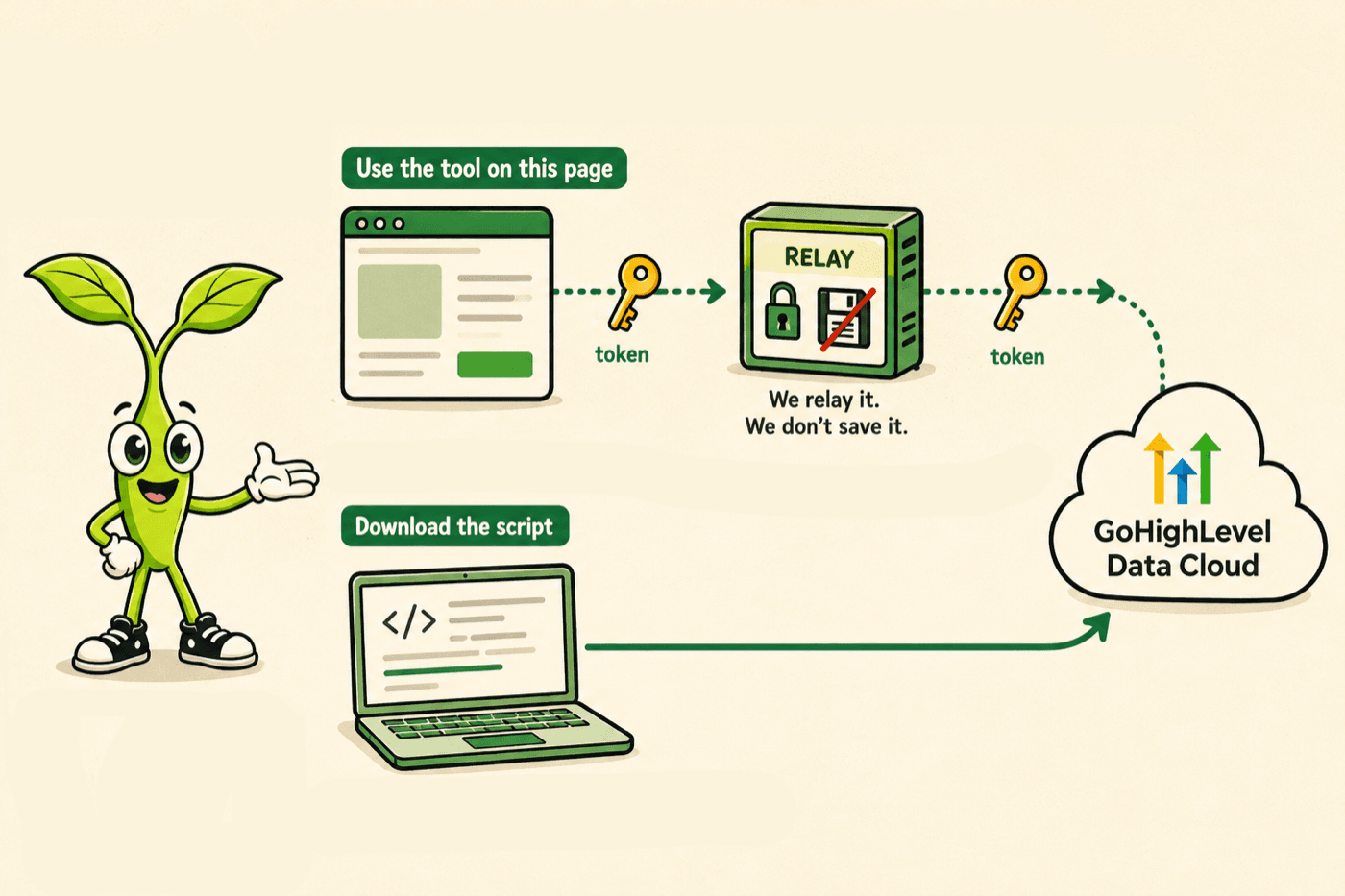
- Your token stays in your browser. It is held in memory while the page is open, never in local storage, and it is wiped when you clear it, close the tab, or leave the tool idle.
- The relay keeps nothing. GoHighLevel blocks direct browser calls, so each request passes through a small relay that forwards it and hands the answer straight back. It never writes your token to a database, a file, a cookie, or a log, and it can only reach GoHighLevel.
- You can skip us entirely. Download the standalone script and run it on your own machine. Your token then goes straight to GoHighLevel and never touches our servers at all.
- Delete it when you are done. A token you no longer need is a token worth removing. Delete the integration in GoHighLevel and it can never be used again, by anyone.
The tool
Export your GoHighLevel account
Read-only. Runs in your browser. Pick what you want, download JSON and CSV.
Your token stays in your browser. It is sent only to GoHighLevel through a relay that never stores or logs it. Prefer zero trust? and run it on your own machine, so your token never touches us at all.
Choose what to export
Big pulls selected (25)
Contact notes, Contact tasks, Contact appointments, Messages (every channel), and 21 more. These walk every record and download files, so a large account can mean thousands of requests and hundreds of megabytes held in this tab. Running it in the browser works, but it can be slow and a closed tab loses the run.
For a full backup we recommend the standalone script. It does exactly the same pull on your own machine, writes straight to a folder with no memory limit, and your token never touches our servers.
Scope
What comes out, and what stays behind
Comes out
- Every contact, with their notes, tasks, and appointments
- Every conversation and every message inside it, plus the full HTML body of each email
- Call recordings as playable audio files, and call transcripts where GoHighLevel has them
- Your media library downloaded as real files, not just a list of links
- Email templates and campaigns saved as HTML you can open in a browser
- Opportunities with pipelines, stages, and lost reasons
- Custom objects, their records, their field definitions, and how records link together
- Calendars with their events, blocked slots, notifications, rooms, and equipment
- Custom fields, custom values, tags, campaigns, workflows, users, and SMS templates
- Forms and surveys with every submission
- Products, prices, collections, reviews, inventory, orders, transactions, and subscriptions
- Invoices, estimates, proposals, recurring schedules, shipping zones, rates, and store settings
- Blogs, funnels, funnel redirects, trigger links, knowledge bases with their FAQs, and social planner posts
- Affiliates with their commissions and payouts, AI agent settings, and connected ad accounts
What it can't pull
- Other sub-accounts. One token covers one location. To export another sub-account, make a token inside that one.
- Agency-level data like the full sub-account list, snapshots, and company settings. A location token cannot reach it. That needs an agency token.
- What is inside your workflows. You get every workflow name and status, but GoHighLevel has no API for the steps, triggers, and conditions in them. PatchyHub is how you get those out, see below.
- The built page content behind funnels and websites, and courses or membership lessons. GoHighLevel does not expose these for export.
- Message attachments as files. You get the links and metadata, not the binaries.
- Ad performance reports. Those need you to choose a metric and a grouping, so they are a reporting job rather than a backup.
- Calls that were never answered have no recording to download, so they are listed in the manifest as skipped rather than failed.
- Anything your token's scopes do not include. It is skipped and listed in the manifest, never guessed at.
- Passwords, card numbers, and other secrets. No API returns these, and this tool never asks for them.
How to create your token (step by step)
A Private Integration Token is a read-only key you make inside your own GoHighLevel sub-account. You choose which scopes it can read, and you can delete it whenever you want. It takes about a minute.
- In your sub-account, open Settings, then Private Integrations.
- Click Create new integration and give it a name like Data export.
- Tick the read scopes for the data you plan to pull, for example contacts, conversations, opportunities, and calendars. Only the scopes you tick can be read.
- Click Create, then copy the token right away. GoHighLevel shows it only once.
Want the exact screens? GoHighLevel's own walkthrough is here: Private Integrations, everything you need to know.

Where to find your Location ID
Your Location ID identifies the sub-account, and it is already sitting in your browser's address bar. Open the sub-account in GoHighLevel and look at the URL. The part right after /location/ is your Location ID.
app.gohighlevel.com/v2/location/ve9EPM428h8vShlRW1KT/dashboardThe highlighted value is your Location ID. Copy that into the tool above.
Paste the token and the Location ID into the tool above and click Test connection. If a scope is missing, the tool skips that data type and tells you, rather than failing the whole export.
How we keep your token safe
This matters, so here is the plain version with nothing hidden.
- The token lives in your browser. It is held in memory while the page is open, never in local storage, and it is wiped when you click Clear, close the tab, or leave the tool idle.
- The relay stores nothing. GoHighLevel blocks direct browser calls, so the on-page tool sends each request through a small relay on our side. That relay forwards the request to GoHighLevel and hands the answer straight back. It never writes your token to a database, a file, a cookie, or a log.
- The relay can only reach GoHighLevel. It is locked to a fixed list of read-only GoHighLevel endpoints, so it cannot be pointed anywhere else.
- You can skip us entirely. Use the download button to grab a small script that runs on your own machine. Your token then goes straight to GoHighLevel and never touches our servers. This is the strongest option, and it is the one we would pick.
When you finish, delete the token
A token you no longer need is a token worth removing. Once your download is complete, go back to Settings, Private Integrations in GoHighLevel and delete the integration you created. That makes the token permanently unusable, by anyone. The tool also reminds you and gives you a one-click Clear button to wipe it from the page.
Where to put your data next
A lot of people run this export because they are tired of renting their CRM. If that is you, there is another way to run one. Seedly is a CRM you buy once and own the source code for, so there are no monthly seats and no platform that can hold your data hostage. If you are weighing the move, our Seedly vs GoHighLevel comparison and our guide to GoHighLevel alternatives where you own the code are the honest place to start. Either way, your export is yours to keep. That is the whole point.
Own your CRM. No subscriptions. Ever.
One payment. Full source code. Unlimited seats. Deploy anywhere.